The first post of this series captured Cursor’s hook payloads, the second rebuilt them into a session/turn/tool tree, and the third extended everything to Claude Code. Adding GitHub Copilot looked like the easy third harness. It turned out to be two harnesses wearing the same name.
GitHub Copilot exposes hooks in two completely different places: the Copilot CLI and Visual Studio Code (its agent-hooks Preview). Same provider identity, same CopilotSpy.App, same named pipe—but two payload dialects with almost opposite strengths. The CLI has a broad, chatty lifecycle (permissions, notifications, errors, compaction, a transformed-prompt event) yet almost no stable identifiers in its hook payloads: no turn ID, no tool-call ID, and MCP tool names flattened into an ambiguous string. VS Code is the mirror image: it restores exact tool_use_id and agent_id, but on a thin eight-event surface with no permissions, no errors and no transcript pointer.
This post focuses on those hook contracts. The current CopilotSpy.App can also use the CLI’s late transcriptPath to tail events.jsonl, preserve a sidecar and enrich the hook tree but it will be covered in Part 5; VS Code remains hooks-only.
This is the fourth post in the series:
- Spying on Cursor: agent hooks, payloads and a simple observer
- Rebuilding the Agent conversation: sessions, turns, thoughts, tools, MCP, skills and summaries
- Spying on Claude Code: more lifecycle events, different blind spots
- Spying on GitHub Copilot twice: CLI hooks versus VS Code (this post)
- Beyond hooks: enriching live sessions with undocumented transcript logs
CopilotSpy reuses the same architecture as in the previous posts: a short-lived console hook forwards each observation to a long-lived WPF viewer over a named pipe. I will not repeat the stdin, pipe and envelope mechanics; this post is about what changes when one provider speaks two dialects.
One provider, two runtime engines
In the first posts, one harness meant one runtime engine—the small class that turns a native payload into HarnessSpy’s neutral traits. Copilot breaks that assumption. CopilotSpy.App listens to a single pipe, but behind the scenes the registry has to resolve two engines for the same provider:
| |
The provider is github-copilot in both cases. What distinguishes them is the surface: CopilotCli or VsCodeAgentHooks. Everything downstream—the tree, the inspector, the summaries—stays provider-neutral, exactly as in the earlier posts. Only the engine that interprets the raw JSON payloads is different.
The two surfaces do not even agree on how many events exist, or how they are spelled. The Copilot CLI v1 contract has 14 camelCase events; the VS Code Local Preview has 8 PascalCase events:
| Copilot CLI (14, camelCase) | VS Code Local (8, PascalCase) |
|---|---|
sessionStart | SessionStart |
sessionEnd | — |
userPromptSubmitted | UserPromptSubmit |
userPromptTransformed | — |
preToolUse | PreToolUse |
postToolUse | PostToolUse |
postToolUseFailure | — |
permissionRequest | — |
notification | — |
agentStop | Stop |
subagentStart | SubagentStart |
subagentStop | SubagentStop |
errorOccurred | — |
preCompact | PreCompact |
Reading the right-handside column top to bottom already tells you what VS Code will not let you see: no session end, no transformed prompt, no tool failure, no permission request, and no notification. It even renames the turn terminator from agentStop to Stop.
I keep those two catalogs deliberately separate rather than merging them into one case-insensitive dictionary, because the CLI can also emit a VS Code-compatible dialect while still being the CLI.
The VS Code configuration nightmare
Creating the CLI json file is a one-liner:
| |
That generates the 14 events harness-spy.json, with the real executable path, a five-second timeout, the dialect and an explicit HarnessSpy identity for every event:
| |
This file can be stored in the .github\hooks folder of the repository root for per repository trigger, in ~/.copilot/hooks or %USERPROFILE%\.copilot\hooks for user level triggering (look at the documentation for more configuration).
Same for the VS Code profile:
| |
That generates the eight events VS Code profile. It looks like a cousin of the CLI file, with a few differences:
| |
Let’s compare the two files: PascalCase PreToolUse instead of camelCase preToolUse, a generic command field instead of powershell, timeout in plain seconds instead of timeoutSec, and—decisively—HARNESS_SPY_RUNTIME_ID set to vscode-agent-hooks. That last value is the authoritative routing key: it is what sends these observations to the VS Code engine instead of the CLI one, no matter how the payload is cased.
The command value hides the sharpest trap. VS Code runs that string through PowerShell on Windows, so it has to begin with the call operator & '<exe>'. Try the natural-looking "C:\\tools\\CopilotSpy.Hook.exe" --event ... instead and PowerShell parses the quoted path as a string literal, echoes it, and executes nothing—the hook silently never fires and you get zero events with no error to explain the silence. It is the same reason the CLI’s powershell field already uses & '...'; VS Code just buries the requirement under a generic command key, where the mistake is much easier to make; I can tell you that I burnt a few tokens to help me understand why the UI of CopilotSpy was not updated…
A different VS Code generator was also added. Why not merging the 14+8 hooks definitions in the same .json file? Long story short, VS Code tries to understand both. So, you would get duplicated events that would be complicated to unentangle. So, the recommendation is to store this hooks definition file in .vscode\hooks folder and disable the .github/hooks folder. It means that you have to create/update your .vscode/settings.json with the following chat.hookFilesLocations enabled/disabled folders:
| |
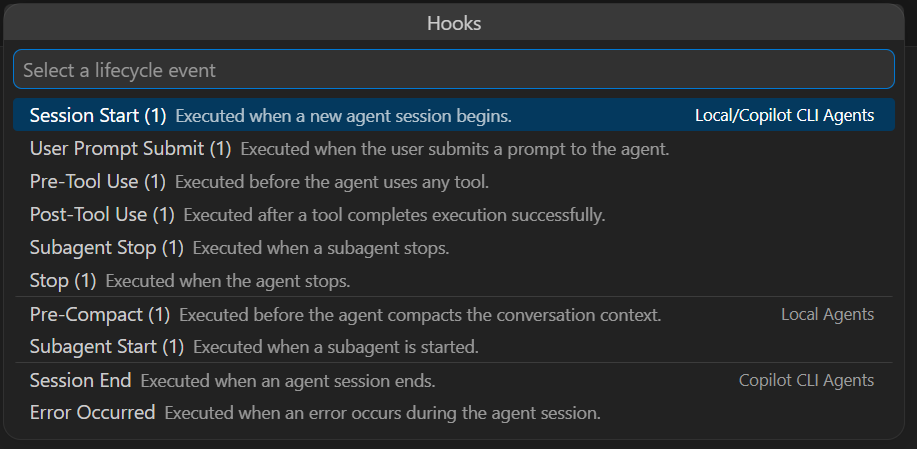
Note that you should manually check the hooks within VS Code via SHIFT+CTRL+P | hooks:

and the dedicated UI summary appears:

Ensure that only the expected 8 hooks are decorated with (1). If the last two hooks are decorated with (1), it means that a Copilot CLI hook definition file has been loaded by VS Code. The two reference documents live in different places too: the GitHub Copilot hooks reference and the VS Code agent hooks reference.
Like the Cursor hook, the Copilot hook stays strictly passive: it writes {} to stdout, never returns permission, additional_context or any other guiding data, and swallows its own failures so a monitoring bug can never block a real Copilot session.
How to figure out the triggered hook name?
Cursor and Claude put the event name inside the payload (hook_event_name). The Copilot CLI does not: it omits any event discriminator and relies on the configured hook key instead. So for the CLI engine, the configured --event key is the authoritative identity, and the payload’s name is only a fallback:
| |
The VS Code engine flips the priority, because VS Code does send a payload name and its configuration is hand-written and less trustworthy:
| |
This is why the generated CLI config passes --event <name> and --hook <name> for every hook: without it, a payload with no hook_event_name would be an anonymous blob.
Casing is not identity
Here is the trap that justifies keeping two catalogs: the Copilot CLI can emit its own camelCase dialect or a VS Code-compatible PascalCase/snake_case dialect. If HarnessSpy inferred “this is VS Code” purely from PascalCase keys, a CLI session speaking the compatible dialect would be misrouted to the wrong engine and lose its CLI identity.
The rule, stated in the architecture, is blunt: do not infer a runtime from casing alone. The generated value for HARNESS_SPY_RUNTIME_ID is authoritative; payload shape is only a fallback:
| |
Only when that environment variable is missing does the detector fall back to payload evidence, and even then it leans on the timestamp type rather than on casing:
| |
The CLI sets timestamp as epoch milliseconds (a JSON number); VS Code set it as an ISO-8601 string. HarnessSpy reads either without rewriting the payload, but treats both as weak confirmation, never as the primary signal. The registry then enforces the final rule: only a VsCodeAgentHooks surface uses the VS Code engine; a CLI PascalCase dialect still resolves to the CLI engine.
Inferring turns without a turn ID
Cursor grouped a turn by generation_id; Claude by prompt_id. The Copilot CLI gives me neither. There is no native turn key at all. So turns are inferred from the prompt/stop boundary. userPromptSubmitted opens a turn, everything until agentStop belongs to it, and the viewer assigns a synthetic derived-N label per session. A userPromptTransformed event—the CLI’s rewritten version of your prompt—nests neatly under the userPromptSubmitted that opened the turn.
There is one ordering quirk worth mentioning: the CLI emits sessionStart a couple of seconds after the first prompt, so its native epoch timestamp is later than the turn it should precede. Sorting purely by timestamp would drop the “new session” node to the bottom of the session. The result reads the way a human expects, even though the raw timestamps disagree:
| |
Every relationship in that tree is inferred, not captured. That is the honest label for a turn built from boundaries rather than from an ID.
Pairing tools without an ID
The same “missing identifier” problem happens for tools. For the CLI, preToolUse and postToolUse carry no tool_use_id. I cannot use the exact -ID matcher that worked for Cursor and Claude.
Instead, the completion is paired to its request by native tool name plus toolArgs. Native names are preserved exactly, just like Claude’s Bash stayed Bash: the CLI’s bash, powershell, view, create, edit, grep, glob and task are never renamed to a canonical vocabulary. One tool does earn a little extra processing: skill. Copilot invokes a skill through a skill tool that carries the activated skill’s id in its native toolArgs.skill (sometimes as a JSON-encoded string), mirroring Claude’s Skill tool that keeps the id under tool_input. HarnessSpy uses that id and renders the call with the shared skill styling, so a Copilot skill run reads as a skill rather than one more opaque tool. The computation of toolArgs reuses the structural JSON normalization from the second post (sorted keys, preserved array order, parsed nested JSON strings), so a completion matches its request even when the JSON is re-serialized.
The unavoidable weakness appears when two calls are identical—same tool, same arguments—inside one turn:
| |
but it should never happen with “smart” models :^)
With no ID and identical signatures, there is nothing left to distinguish them, so HarnessSpy pairs them in FIFO/arrival order: the first completion closes the first request. Every request still ends up with exactly one completion and none is orphaned, but this last step is explicitly a heuristic.
The MCP names resolution
Copilot’s most interesting blind spot is related to MCP. Remember how the other harnesses mark an MCP call:
- Cursor: a
MCP:prefix on the tool name and a dedicatedmcp_server_namefield. - Claude: the unambiguous
mcp__<server>__<tool>convention.
The Copilot CLI does neither. It flattens an MCP call to <server>-<tool> with no marker at all, and the hyphen boundary is ambiguous because both the server name and the tool name can themselves contain hyphens and underscores. Faced with dotnet-dstrings-get_duplicated_strings, where does the server end? Splitting blindly on the first hyphen would give the server dotnet, which is wrong—it is my dotnet-dstrings MCP server from the first post.
HarnessSpy never splits blindly on hyphens. Instead the classifier combines three complementary, hooks-only signals.
Signal 1 — learn the boundary from events. Two events use an unambiguous <server>/<tool> form with a slash. The permissionRequest names the tool as dotnet-dstrings/get_duplicated_strings, and the permission notification message reads Use MCP tool: dotnet-dstrings/get_duplicated_strings. A slash never appears inside a server name, so the first slash is the boundary:
| |
Signal 2 — a negative allowlist of built-in tools. Even before any permission event, the classifier knows the CLI’s built-in tools. Anything outside that set is treated as MCP, with the server still unknown:
| |
Signal 3 — a per-session cache. The <server>/<tool> pairs learned from signal 1 are remembered per session, so the flattened preToolUse/postToolUse names can later be split back into server and tool. Put together, the evidence flows like this within one session:
| |
Notice the order: in real traces, the request often arrives before the permission that defines the boundary. The completion still pairs with its request by signature, and the whole thing is summarized as one MCP call, not as a native tool—even though the server name was only learned in the middle. The cache is reset on sessionStart and sessionEnd, so a reused session id never inherits an inconsistent mapping.
This is learning by observation. It is good enough to color the call as MCP and, once a permission or notification appears, to attribute the server correctly. But it is inference, and it is labeled as such in the UI.
Attaching a permission prompt to the call it is related to
Detecting the MCP boundary is not the only job those permission events do. A permissionRequest—and the permission_prompt notification that mirrors it—describes a tool call that is still in flight, so it appears under that request in the tree, not floating loose at the turn level. One issue is that Copilot spells the very same call three different ways across the three events:
- the request is
apply_patchwith the path buried inside a raw patch string, or<server>-<tool>for an MCP call, and carries its input undertoolArgs; - the permission is
editwith a structuredfile_path, or<server>/<tool>, and carries its input undertoolInput; - the notification has no structured input at all—only free text such as
Edit file: <path>orRun command: <cmd>.
Tool name equality is useless here, so HarnessSpy matches name by the strongest signal the two events share in the following order: target file name, then shell command, then arguments.
The file name is inferred out of a structured file_path/path, an apply_patch header (*** Update File: …), or the notification’s message text; a Run command: message that embeds a Windows path is bound by its command and never mistaken for a file. Two in-flight MCP calls that share a name are differentiated by their arguments alone, so permissions that arrive out of order still land on the right request.
Hooks alone do not reveal whether the user granted the permission. CLI transcript enrichment can later attach permission.completed to the same tool request as the next post will explain.
What only the CLI tells you
For all its identifier weakness, the CLI is nevertheless the most verbose. Beyond prompts and tools, it exposes lifecycle events that VS Code simply does not have:
| CLI event | What it adds |
|---|---|
userPromptTransformed | The harness-rewritten prompt, nested under the submitted prompt |
permissionRequest | The tool (and MCP <server>/<tool>) awaiting approval, nested under its corresponding request |
notification | User-visible messages; a permission_prompt type is well identified and attaches to its request |
postToolUseFailure | A failed tool call with its error, paired by signature |
errorOccurred | A runtime error with errorContext and a recoverable flag |
preCompact | Context compaction is starting, with its trigger |
agentStop | Normally carries the late transcriptPath (more on that below) |
The permission and notification events are the same ones that feed the MCP classifier, so they now pull triple duty: they highlight an approval prompt in the tree, teach the session its MCP boundaries, and nest under the in-flight request they guard (see the previous section). As with Claude, HarnessSpy only observes a permissionRequest; it never answers it. If you were interested in speeding up your work by accepting all actions except blacklisted one, feel free to change the hook empty return to stdout for permissionRequest or preToolUse.
Subagents expose the CLI’s identifier problem in miniature. The subagentStart payload does not carry the agentId that subagentStop later provides—start only has an agentName. The two events describe the same subagent with different keys, so they can only be paired heuristically, by name.
VS Code: exact IDs but for much less details
When you switch to the VS Code engine, the trade-off inverts completely. Everything the CLI lacks in identity, VS Code provides. Its PreToolUse and PostToolUse carry a real tool_use_id, so tool pairing is exact rather than by signature.
Subagents get the same treatment: agent_id is present on both SubagentStart and SubagentStop, so their lifecycle is exact—no name-matching guess. VS Code also models edits as a first-class multi-file operation. Its editFiles tool passes an array of files:
| |
HarnessSpy reads the whole tool_input.files array and feeds every entry into the written-files summary, instead of chasing one path at a time.
The price for that precision is reach. VS Code gives me only eight events. There is no permissionRequest, no notification, no postToolUseFailure, no errorOccurred, no userPromptTransformed, and no sessionEnd bracket—just Stop. And, crucially for the next post, no transcript pointer at all. VS Code is, and remains, hooks-only; but it is still a preview so who knows what will be available in the future.
What Copilot does not give you
Laying the two Copilot surfaces beside Cursor and Claude makes the hook contracts precise. This table deliberately excludes what Copilot CLI transcript enrichment and the separate SessionViewer can recover later:
| Capability | Cursor | Claude Code | Copilot CLI | Copilot VS Code |
|---|---|---|---|---|
| Native turn key | generation_id | prompt_id | none (derived) | none (derived) |
| Tool-call id | tool_use_id (reusable) | tool_use_id | none (signature/FIFO) | tool_use_id (exact) |
| Subagent id | subagent_id | agent_id | agentName only at start | agent_id (exact) |
| Inner shell/MCP span | before/after hooks | none | none | none |
| Parallel batch event | inferred from overlap | native PostToolBatch | inferred from overlap | inferred from overlap |
| Permission lifecycle | indirect (tool failure) | request + denial + notif. | request + notification | none |
| Runtime error event | postToolUseFailure | StopFailure and failures | postToolUseFailure + errorOccurred | none |
| MCP identity in the hook | MCP: prefix + server | mcp__server__tool | flattened <server>-<tool> (inferred) | not observed |
| Transcript pointer | transcript_path | main + agent_transcript_path | verified on agentStop; runtime accepts sessionEnd if it carries the field | none |
| Token/cache counters | yes | none | none in hooks | none |
Three absences should be pointed out:
Copilot has no native hook turn ID on either surface.
It has no inner execution span—nothing like Cursor’s dedicated
beforeShellExecution/beforeMCPExecutionpair that timed the transport layer separately from the model’s tool call.And it has no batch event: Claude’s
PostToolBatchgives an authoritative parallel grouping, whereas Copilot parallelism is only inferred from overlapping intervals, exactly as in the second post. Finally, VS Code has no transcript pointer, which limits how much the next post can add to it.
Conclusion
GitHub Copilot taught me that a provider name is not a unique observability contract:
One provider can have two surfaces. The CLI and VS Code share
github-copilotbut disagree on event count, casing, identity and even the timestamp type—so HarnessSpy routes them to two engines and never guesses the surface from casing.Weak hook identity forces more guesses. Without a hook turn ID or tool-call ID, the CLI derives turns from prompt/stop boundaries and pairs hook completions by signature, then by arrival order.
Ambiguity can be narrowed, not erased. Flattened MCP names have no marker, but permission and notification events, a built-in allowlist and a per-session cache recover the server name boundary without ever splitting blindly on a hyphen character.
Precision and reach trade off. VS Code’s exact
tool_use_idandagent_idcome on a thin eight-event surface with no permissions, no errors and no transcript; the CLI’s rich lifecycle comes without stable IDs.
The next post leaves hooks behind—well, almost—to explain how the undocumented transcript files could enrich each harness spy tool live tree.
