In my previous posts, I explained how to use DIA and DbgHelp to map a method to its line in source code. I forgot to mention that it was correct for .NET Core but not for the “old” .NET Framework Windows PDB format. Instead of encoding the method token in the name, the symbol file contains the name of the methods. So, how to do the mapping for .NET Framework assemblies? You will find the answer (plus some tricks) in this article.
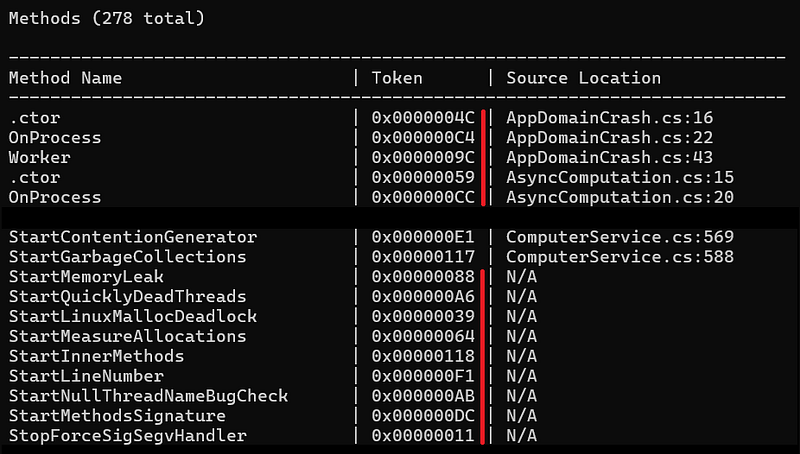
When I started to work on the support of the old Windows PDB format, I looked at what existed to parse the raw format and… I decided to try DbgHelp instead. With this first implementation, I realized that some token where missing and source code information was not retrieved for most of the methods.
So, I looked for another API to use and I found ISymUnmanagedReader. The usage philosophy is totally different from DIA or DbgHelp.
A little bit of magic
This interface is implemented in diasymreader.dll that comes with every .NET Framework installation. But you need to do COM magic to get it. After having called CoInitialize to setup COM, you ask for an instance of ISymUnmanagedBinder from CLSID_CorSymBinder_SxS:
| |
From the binder, you can get the ISymUnmanagedReader interface corresponding to the assembly you are interested in with GetReaderForFile. However, there are two tiny details to consider.
First, one parameter expects the path to the assembly, not to the .pdb file. That symbol file has to be stored in the same folder but note that the documentation states that you could have more flexible search with ISymUnmanagedBinder2::GetReaderForFile2 but I did not test it.
The second detail is the first parameter: an instance of IMetaDataImport for the same assembly. The steps to get it are… complicated.
Hosting the CLR
The idea is to host the .NET Framework and get the corresponding ICLRMetaHost interface:
| |
Calling the CLRCreateInstance API allows you to get an instance of ICLRMetaHost from which you could enumerate installed version of .NET Framework. In my case, I know which version I want:
| |
The ICLRRuntimeInfo interface allows you to get access to runtime services via GetInterface:
| |
The service I’m interested in is the IMetadataDispenser interface that allows you to “open a scope” on the assembly you are interested in:
| |
Note that the first parameter is the path to the assembly not to the .pdb file. The scope is abstracted by an IMetadataImport interface I have already described and that is needed to call GetReaderForFile: and get the ISymUnmanagedReader:
hr = pBinder->GetReaderForFile(_pMetaDataImport, wModulePath.c_str(), nullptr, &_pReader);
The road to get symbol details for a method
The ISymUnmanagedReader interface implements GetMethod to get details about a given method token via an ISymUnmanagedMethod interface. So, the next question is how to get these tokens. If you remember the previous article, these tokens are from the 06 MethodDef table in the assembly metadata; starting from 06000001 to the last one.
This means that you could write a simple loop starting from 1 up to a hardcoded maximum value, call TokenFromRid(index, mdtMethodDef) to get the corresponding token. However, since you are a professional developer, you would search for the exact number of tokens from IMetadataTables retrieved from IMetadataImport:
| |
Now that you have the number of rows (i.e. number of methods defined in the metadata), it is easy and safe to get method information from symbols:
| |
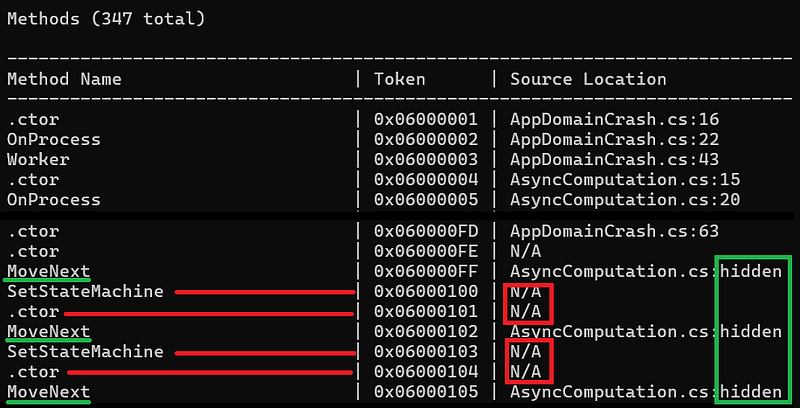
Note that GetMethod might fail (returning E_FAIL) for P/Invoked functions, abstract methods, or methods decorated with DebuggerHidden attribute.
Give me line and source code!
For the other methods with symbol information, you can get its token via the GetToken method. The ISymUnmanagedMethod interface allows low level access to line/column mapping that is beyond the scope of this article. At a high level, positions in source file are named sequence points. Call GetSequencePointCount to get… the number of sequence points for a given method.
The next step is to call GetSequencePoints with the number of points you want and the corresponding arrays of offsets, lines, columns, end lines, end columns and ISymUnmanagedDocument. In my case, I’m only interested in where the method starts so the first sequence point is good enough:
| |
The source file is described by ISymUnmanagedDocument that provides its name when GetURL is called:
| |
The final interesting trick is that the line number might have the special 0xFEEFEE value. It means that the line is hidden. I have seen it for methods generated by the C# compiler such as MoveNext for async state machines or anonymous methods:

The source code is available from my Github repository.
Happy coding!
