Testing the statistical results
In parallel of the performance impact, it is important to validate the expected statistical distribution of the sampled allocations. Basically, I need to execute the same run of allocations multiple times in a row. Each run allocates the same number of instances of different types. For example, it is interesting to know if sampling instances of types with sizes proportional to a base value gives good results. Same question for totally different sized types or with Finalizers.
I would like to pass the number of runs to execute and a given scenario to a C# runner program and listen to the emitted events in another C# listener.
I’m facing 3 issues here:
- How many instances are allocated to validate the upscaling algorithm (sampled vs real count)
- What are the types I want to focus on because I don’t want to hard code them in the listener application.
- When does each run start?
It would be great if I could send the answer to these questions via events so the listener would know at runtime. Well… This is exactly what a class inherited from EventSource allows you to do!
In the runner application, I’ve defined the AllocationsRunEventSource that is decorated with the EventSource attribute to set its name that will be used as a provider name like Microsoft-Windows-DotNETRuntime for the .NET runtime provider.
| |
To make the payload serialization and parsing easy, the list of types that will be allocated is passed as a string with the following format allocatedTypes = “Object24;Object48;Object72;Object32;Object64;Object96”.
The code of the runner calls these methods as expected at different moment of the execution:
| |
Instead of recording the events with dotnet-trace, this time I’m using TraceEvent and Microsoft.Diagnostics.NETCore.Client to code a listener application. The code is very similar to what was presented for my dotnet-fullgc CLI tool except that I’m enabling the AllocationsRun provider corresponding to the event source of the runner in addition to the .NET runtime one:
| |
The custom events from that provider are received via the source.Dynamic.All C# event:
| |
Because TraceEvent is not already aware of the new AllocationSampled event emitted by the PR code, it will also be received via the same OnEvent handler:
| |
The parsing of the payload of the run related events is done the same way as for AllocationSampled by a dedicated xxxData class:
| |
By keeping track of this data, it is possible to show each iteration results:
| |
that integrates AllocationTick numbers too.
At the end of the run, error distribution per type is also computed over the iterations:
| |
You could use the same mechanisms (a custom EventSource to emit additional information and an EventPipe listener to aggregate the data) for your own usage. This is a different way to use EventSource rather than emitting events for monitoring like what is done by the BCL.
Testing the standalone GC
In addition to the usual .NET GC, it is needed to validate that the changes are also working for the standalone GC. Long story short, it is possible to replace the existing .NET garbage collector by your own implementation. For the test, I needed to check that the standalone GC clrgcexp.dll generated by the .NET compilation generates the expected AllocationSampled events when the corresponding keyword with informational verbosity is enabled.
Debugging NativeAOT scenarios
The final step was to implement the feature for the NativeAOT scenario. When you build your C# application for NativeAOT, a lot happens behind the scenes, based on compilers known by Visual Studio corresponding to the official released version of the .NET runtime. In my case, I needed to use the brand-new code of my local branch and debug some simple C# applications. The steps to reach that goal are not that simple.
First, you follow the steps given by the documentation to build AOT CLR in debug and libs in release:
| |
Then, open src\coreclr\tools\aot\ilc.sln
the repro project contains a program.cs file where you write the C# code you want to test and debug.
When you build a NativeAOT application, you need to select if you want the runtime that emits events or not. This is done by setting the EventSourceSupport to true in the .csproj:
Add the following in the .csproj to get events:
| |
However, with the repro project, you need to change ILCompiler.csproj in a different way:
| |
Also, change the reproNative.vcxproj file to bind to eventpipe-enabled.lib instead of eventpipe-disabled.lib for the platform/configuration you want to debug:
| |
Then, build repro in Debug x64
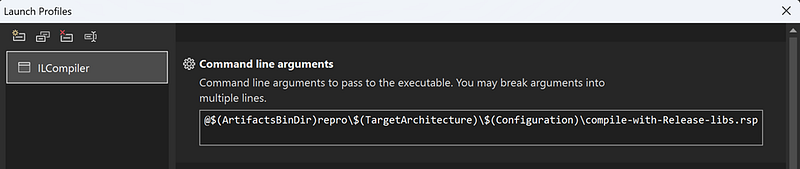
Next, change the target for the ILCompiler project:

Build and run it to generate the .obj file corresponding to the repro project
Finally, open src\coreclr\tools\aot\ILCompiler\reproNative\reproNative.vcxproj that will allow you to debug the program.cs you’ve just built!
