As shown in the previous post, the processing of ProcessInfo diagnostic commands is easy because you send a request and read the different fields from the response. This is different if you want to receive events from the CLR via EventPipe. In C#, the TraceEvent nuget package wraps everything under a nice event handler based model as shown in many of my previous posts.
Behind the scene, a StartSession command is sent (more details about the parameters later) and the response contains the numeric ID of the session. Then, the events will be read from the IPC channel as a binary stream of data with the “nettrace“ file format. The collection ends when the StopTracing command is sent.
The source code is available from my github repository.
Hidding the transport layer: IIpcEndoint#
Unlike the previous post, to send the command and read the response back from the CLR , I’m wrapping the transport layer with the IIpcEndpoint interface:
 1
 2
 3
 4
 5
 6
 7
 8
 9
10
11
12
13
| class IIpcEndpoint
{
public:
virtual bool Write(LPCVOID buffer, DWORD bufferSize, DWORD* writtenBytes) = 0;
virtual bool Read(LPVOID buffer, DWORD bufferSize, DWORD* readBytes) = 0;
virtual bool ReadByte(uint8_t& byte) = 0;
virtual bool ReadWord(uint16_t& word) = 0;
virtual bool ReadDWord(uint32_t& dword) = 0;
virtual bool ReadLong(uint64_t& ulong) = 0;
virtual bool Close() = 0;
virtual ~IIpcEndpoint() = default;
};
|
It abstracts the write and read accesses to the underlying transport layer. In addition, the base class accepts a “recorder” that allows me to store what is received from the CLR into any kind of storage (today only a file-based recorder that helped a lot to reproduce specific situations without the need to have a running process to connect to):
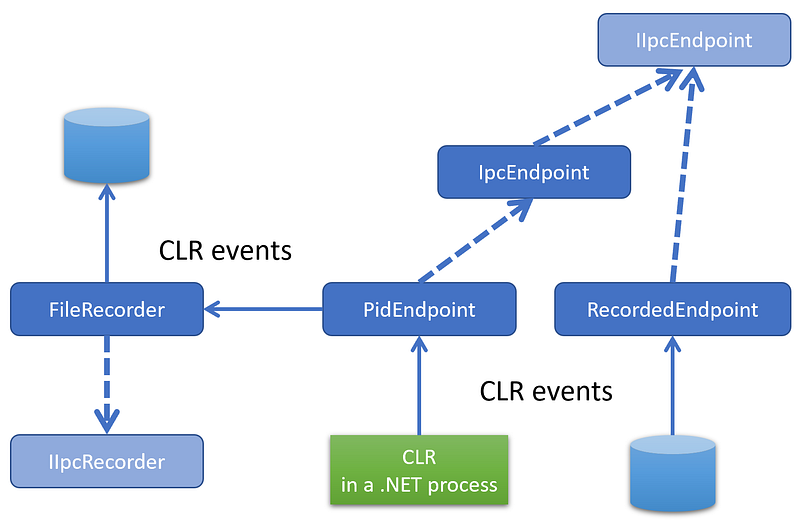
The PidEndpoint class accepts the process id of the running .NET application to monitor its CLR events and an optional recorder implementing the IIpcRecorder interface. The Create static factory implementation creates the expected named pipe on Windows (or the domain socket on Linux) and stores the handle into its _handle field:
 1
 2
 3
 4
 5
 6
 7
 8
 9
10
11
12
13
14
15
16
17
18
19
20
21
22
23
24
25
26
27
28
29
30
31
32
33
34
35
36
37
38
39
40
41
42
| PidEndpoint* PidEndpoint::CreateForWindows(int pid, IIpcRecorder* pRecorder)
{
PidEndpoint* pEndpoint = new PidEndpoint(pRecorder);
// build the pipe name as described in the protocol
wchar_t pszPipeName[256];
int nCharactersWritten = -1;
nCharactersWritten = wsprintf(
pszPipeName,
L"\\\\.\\pipe\\dotnet-diagnostic-%d",
pid
);
// check that CLR has created the diagnostics named pipe
if (!::WaitNamedPipe(pszPipeName, 200))
{
auto error = ::GetLastError();
std::cout << "Diagnostics named pipe is not available for process #" << pid << " (" << error << ")" << "\n";
return nullptr;
}
// connect to the named pipe
HANDLE hPipe;
hPipe = ::CreateFile(
pszPipeName, // pipe name
GENERIC_READ | // read and write access
GENERIC_WRITE,
0, // no sharing
NULL, // default security attributes
OPEN_EXISTING, // opens existing pipe
0, // default attributes
NULL); // no template file
if (hPipe == INVALID_HANDLE_VALUE)
{
std::cout << "Impossible to connect to " << pszPipeName << "\n";
return nullptr;
}
pEndpoint->_handle = hPipe;
return pEndpoint;
}
|
The next step is to open a tracing session by sending the StartSession command.
The Trace diagnostic commands#
Following the same object model provided by the Microsoft.Diagnostics.NETCore.Client nuget, my DiagnosticsClient class hides the transport layer. It also exposes high level functions such as OpenEventPipeSession to initiate a trace event session with the CLR:
1
| EventPipeSession* OpenEventPipeSession(uint64_t keywords, EventVerbosityLevel verbosity);
|
If you remember from TraceEvent, you need a few parameters to create a session:
- size of circular buffers used by the CLR to cache events (same as Perfview, use 16 MB as default)
- netttrace format (i.e. value of 1)
- if rundown events are needed
- a list of providers (“Microsoft-Windows-DotNETRuntime” for the CLR in my case)
- keywords
- verbosity level
- possible arguments (none here)
Here is the corresponding C++ description of the command type:
 1
 2
 3
 4
 5
 6
 7
 8
 9
10
11
12
13
14
15
16
17
18
19
20
21
22
23
24
25
26
27
28
29
30
31
| const uint8_t DotnetProviderMagicLength = 32;
struct MagicProvider
{
wchar_t Magic[DotnetProviderMagicLength];
};
// 32 wchar_t (including \0)
const MagicProvider DotnetProviderMagic = { L"Microsoft-Windows-DotNETRuntime" };
const uint32_t CircularBufferMBSize = 16;
const uint32_t NetTraceFormat = 1;
#pragma pack(1)
struct StartSessionMessage : public IpcHeader
{
uint32_t CircularBufferMB; // 16 MB
uint32_t Format; // 1 for NetTrace format
uint8_t RequestRundown; // 0 because don't want rundown
// array of provider configuration
uint32_t ProviderCount; // 1 only: Microsoft-Windows-DotNETRuntime
uint64_t Keywords; // from EventKeyword
uint32_t Verbosity; // from EventPipeEventLevel
uint32_t ProviderStringLen; // number of UTF16 characters = 32 (including last \0)
union // dotnet provider name
{
MagicProvider _magic;
uint8_t Provider[2 * DotnetProviderMagicLength];
};
uint32_t Arguments; // 0 for empty string (no argument)
};
|
The code to fill up the command is straightforward:
 1
 2
 3
 4
 5
 6
 7
 8
 9
10
11
12
13
14
15
16
17
18
19
20
21
| StartSessionMessage* CreateStartSessionMessage(uint64_t keywords, EventVerbosityLevel verbosity)
{
auto message = new StartSessionMessage();
::ZeroMemory(message, sizeof(message));
memcpy(message->Magic, &DotnetIpcMagic_V1, sizeof(message->Magic));
message->Size = sizeof(StartSessionMessage);
message->CommandSet = (uint8_t)DiagnosticServerCommandSet::EventPipe;
message->CommandId = (uint8_t)EventPipeCommandId::CollectTracing2;
message->Reserved = 0;
message->CircularBufferMB = CircularBufferMBSize;
message->Format = NetTraceFormat;
message->RequestRundown = 0;
message->ProviderCount = 1;
message->Keywords = (uint64_t)keywords;
message->Verbosity = (uint32_t)verbosity;
message->ProviderStringLen = DotnetProviderMagicLength;
memcpy(message->Provider, &DotnetProviderMagic, sizeof(message->Provider));
message->Arguments = 0;
return message;
}
|
The provider list is defined with the ProviderCount field and string containing the list (only one here) follows the Verbosity field. To start the session, it is needed to send the StartSession message and read the session id from the response:
 1
 2
 3
 4
 5
 6
 7
 8
 9
10
11
12
13
14
15
16
17
18
19
20
21
22
23
24
25
26
27
28
29
30
31
32
33
34
35
36
37
38
| bool EventPipeStartRequest::Process(IIpcEndpoint* pEndpoint, uint64_t keywords, EventVerbosityLevel verbosity)
{
// send an StartSessionMessage and parse the response
StartSessionMessage* pMessage = CreateStartSessionMessage(keywords, verbosity);
DWORD writtenBytes = 0;
if (!pEndpoint->Write(pMessage, pMessage->Size, &writtenBytes))
{
return false;
}
// analyze the response
IpcHeader response = {};
DWORD bytesReadCount = 0;
if (!pEndpoint->Read(&response, sizeof(response), &bytesReadCount))
{
return false;
}
if (response.CommandId != (uint8_t)DiagnosticServerResponseId::OK)
{
return false;
}
// get the session ID from the payload
uint16_t payloadSize = response.Size - sizeof(response);
if (payloadSize < sizeof(uint64_t))
{
return false;
}
if (!pEndpoint->ReadLong(SessionId))
{
return false;
}
return true;
}
|
Once the StartSession command has been sent, the events corresponding to the given provider/keywords/verbosity (here the CLR runtime/gc+exception+contention/verbose)
1
2
3
4
5
6
| auto pSession = pClient->OpenEventPipeSession(
EventKeyword::gc |
EventKeyword::exception |
EventKeyword::contention,
EventVerbosityLevel::Verbose // required for AllocationTick
);
|
will be read from the event pipe. Since this action will be synchronous, it is recommended to dedicate a thread to read and process the events:
 1
 2
 3
 4
 5
 6
 7
 8
 9
10
11
12
13
14
15
16
17
18
| if (pSession != nullptr)
{
DWORD tid = 0;
auto hThread = ::CreateThread(nullptr, 0, ListenToEvents, pSession, 0, &tid);
std::cout << "Press ENTER to stop listening to events...\n\n";
std::string line;
std::getline(std::cin, line);
std::cout << "Stopping session\n\n";
pSession->Stop();
std::cout << "Session stopped\n\n";
// test if it works
::Sleep(1000);
::CloseHandle(hThread);
}
|
The ListenToEvents callback executed by the new thread is “simply” listening to the event pipe of the session:
1
2
3
4
5
6
7
8
| DWORD WINAPI ListenToEvents(void* pParam)
{
EventPipeSession* pSession = static_cast<EventPipeSession*>(pParam);
pSession->Listen();
return 0;
}
|
Before describing how to read the events, it is important to understand how to stop the flow. First, inside the EventPipeSession, the internal loop that reads events needs to exit thanks to the _stopRequested boolean:
 1
 2
 3
 4
 5
 6
 7
 8
 9
10
11
12
13
14
| bool EventPipeSession::Stop()
{
_stopRequested = true;
if (_pid == -1)
return true;
// it is neeeded to use a different ipc connection to stop the Session
DiagnosticsClient* pStopClient = DiagnosticsClient::Create(_pid, nullptr);
pStopClient->StopEventPipeSession(SessionId);
delete pStopClient;
return true;
}
|
In addition, a message with StopTracing command id from the EventPipe command set needs to be sent to tell the CLR to stop sending the events. This message must be sent through a different IPC channel (hence the pStopClient variable used in the previous code. The StopEventPipeSession helper function uses the EventPipeStopRequest wrapper:
1
2
3
4
5
| bool DiagnosticsClient::StopEventPipeSession(uint64_t sessionId)
{
EventPipeStopRequest request;
return request.Process(_pEndpoint, sessionId);
}
|
The StopSession command accepts the session ID as single parameter:
1
2
3
4
5
| #pragma pack(1)
struct StopSessionMessage : public IpcHeader
{
uint64_t SessionId;
};
|
The processing of the stop request is to create such a message and send it through the IPC channel:
 1
 2
 3
 4
 5
 6
 7
 8
 9
10
11
12
13
14
15
16
17
18
19
20
21
22
23
24
25
26
27
28
29
30
31
32
| StopSessionMessage* CreateStopMessage(uint64_t sessionId)
{
StopSessionMessage* message = new StopSessionMessage();
::ZeroMemory(message, sizeof(message));
memcpy(message->Magic, &DotnetIpcMagic_V1, sizeof(message->Magic));
message->Size = sizeof(StopSessionMessage);
message->CommandSet = (uint8_t)DiagnosticServerCommandSet::EventPipe;
message->CommandId = (uint8_t)EventPipeCommandId::StopTracing;
message->Reserved = 0;
message->SessionId = sessionId;
return message;
}
bool EventPipeStopRequest::Process(IIpcEndpoint* pEndpoint, uint64_t sessionId)
{
StopSessionMessage* pMessage = CreateStopMessage(sessionId);
DWORD writtenBytes;
if (!pEndpoint->Write(pMessage, pMessage->Size, &writtenBytes))
{
Error = ::GetLastError();
std::cout << "Error while sending EventPipe Stop message to the CLR: 0x" << std::hex << Error << std::dec << "\n";
delete pMessage;
return false;
}
delete pMessage;
... // handle the response
return true;
}
|
When the stop command is received by the CLR, the remaining “data” (more on this in the next episode) is sent through the first IPC channel before being closed. This is how the code knows that the session can stop listening to the EventPipe.
The next episode will start to parse the nettrace stream of events.
Resources#

