Introduction
With my colleague Eugene, we spent a long time analyzing performances of one of Criteo main applications with Perfview. The application is processing thousand of requests in an asynchronous pipeline full of async/**await **calls. During our research, we ended up with weird callstacks that looked kind of “reversed”. The goal of this post is to describe why this could happen (even in Visual Studio).
Let’s see the result of profiling in Visual Studio
I wrote a simple .NET Core application that simulates a few async/**await **calls:
| |
ComputeAsync is starting a bunch of tasks that will await other **async **methods:
| |
Unlike the Compute1 and Compute2 methods, the last Compute3 is waiting 1 second before consuming some CPU with square root computation in CompusumeCPUXXX helpers:
| |
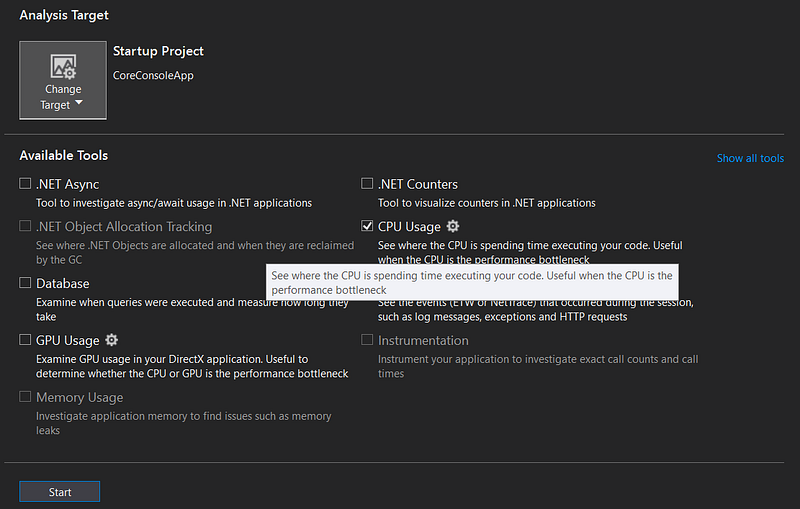
From Visual Studio, profile the CPU usage of this test program via Debug | Performance Profiler…
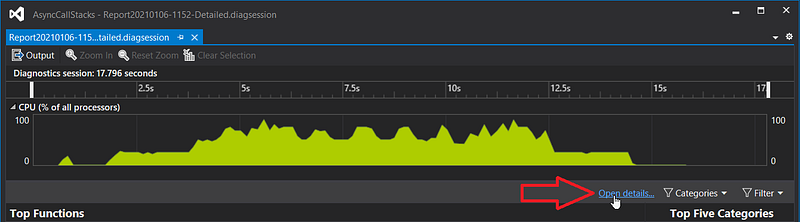
In the summary result panel, click the Open Details… link
And pick the Call Tree view

You should see two paths of execution:

If you open the last one, you should see the expected chain of calls:
… if the methods were synchronous; which is not the case. So Visual Studio did a great job in dealing with the implementation details of async/**await **to present a nice call stack.
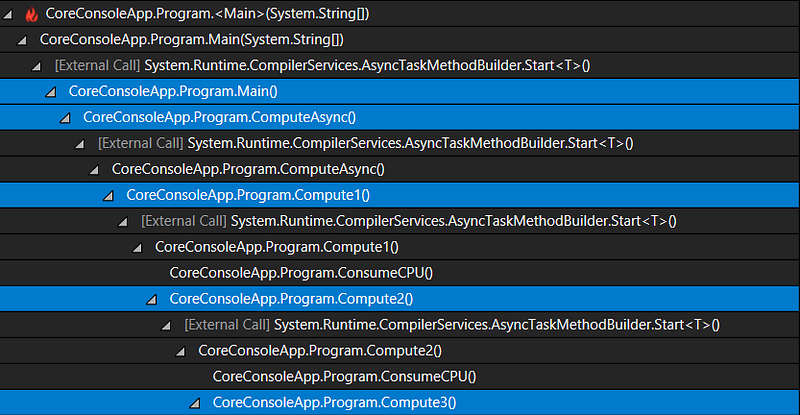
However, if you open the first node, you get something more disturbing:
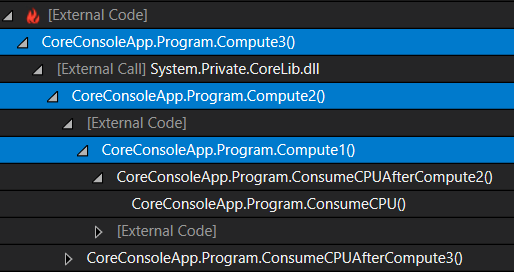
… if you don’t know how async/**await **is implemented. My Compute3 code is definitively not calling Compute2 which is not calling Compute1! This is where Visual Studio smart frame/callstack reconstruction brings more confusion than anything else. So what’s going on?
Understanding async/await implementation
Unlike Visual Studio that is hiding real calls, you should be able to see what methods are really called when analyzing a memory dump with dotnet-dump and the pstacks command:
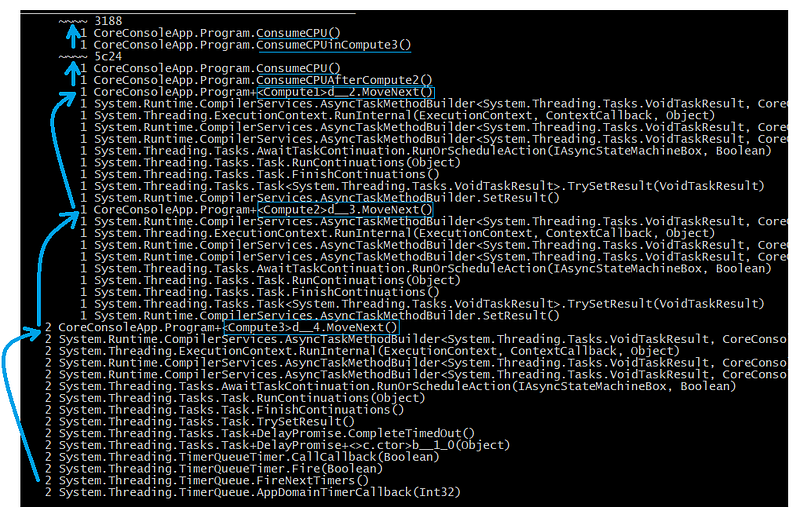
If you follow the arrows from the bottom to the top, you should see the following synchronous (because as frame in thread callstacks) calls:
- a timer callback is calling
d__4.MoveNext(): this corresponds to the end of theTask.DelayinCompute3method. d__3.MoveNext()gets called to continue the code afterawait Compute3d__.MoveNext()gets called to continue the code afterawait Compute2ConsumeCPUAfterCompute2()gets called as expectedComputeCPU()** **orConsumeCPUInCompute3()get called as expected
All the fancy methods names are due to “state machine” types that is generated by the C# compiler when you (1) define **async **methods that (2) await other **async **methods (or any “awaitable” object). Their role is to manage a “state machine” to execute code synchronously up to an await call, and again up to the next await call, and again and again until the method returns.
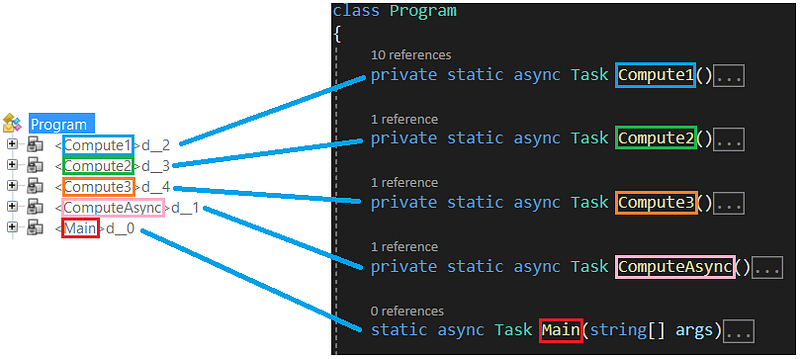
All these d__* types contains fields corresponding to each async method local variables and parameters if any. For example, here is what is generated for the ComputeAsync** **and Compute1/2/3 async methods without any local or parameter:
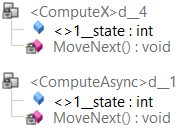
The integer <>1__state field keeps track of the “execution state” of the machine. For example, after the state machine is created in Compute1, this field is set to -1:
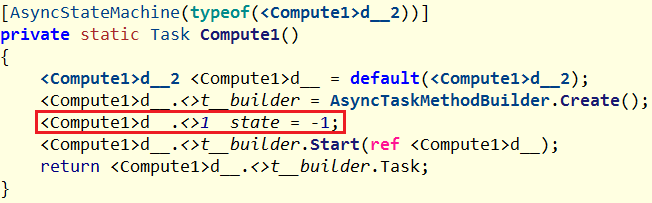
I don’t want to dig into the builder details but just let’s just say that the MoveNext method of the state machine d__2 gets executed (by the same thread).
Before looking at the MoveNext implementation corresponding to the Compute1 method (without exception handling), keep in mind that it has to :
- run all code up to an **await **call,
- change the “execution state” (more on this later)
- do some magic to execute that code in another thread (if needed — more on this later)
- come back to continue the execution of the code after the await call
- and do that up to the next await call again and again
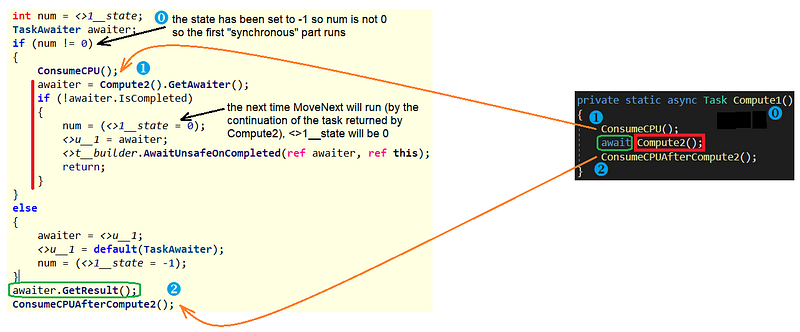
Since <>1__state is -1, the first “synchronous” part of the code is executed (i.e. calling ComsumeCPU method).
The Compute2 method is then called to get the corresponding awaitable object (here a Task). If the task runs immediately (i.e. no await call such as a simple Task.FromResult() in the async method), IsCompleted() will return true and the code after the await call will be run by the same thread. Yes it means that async/await calls could be run synchronously by the same thread: why creating a thread when it is not needed?
If the Task is passed to the ThreadPool to be executed by a worker thread, the <>1__state value is set to 0 (so the next time MoveNext is called, the next “synchronous” part (i.e. after the await call) will be executed). The code now calls awaitUnsafeOnCompleted to do its magic: adding a continuation to the Compute2 task (the first awaiter parameter) so that MoveNext will be called on that same state machine (the second this parameter) when the task ends. The current thread then quietly returns.
So when the Compute2 task ends, its continuation runs to call MoveNext this time with <>1__state as 0 so the last two lines are executed: awaiter.GetResult() returns immediately because the Task returned by Compute2 already ended and the last CinsumeCPUAfterCompute2 method is now called.
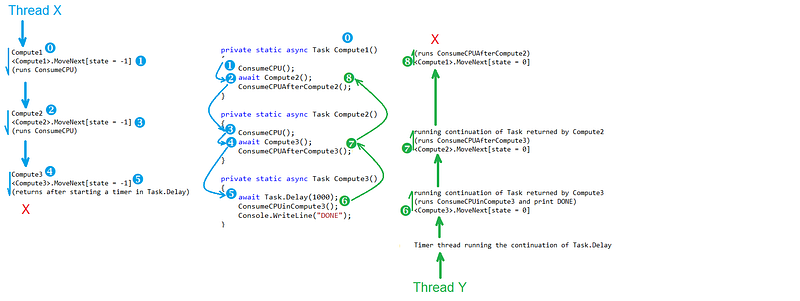
Here is a summary of what is happening:
- Each time you see an async method, the C# compiler is generating a dedicated state machine type with a
MoveNextmethod that is responsible for executing your code synchronously between await calls - each time you see an await call, it means that a continuation will be added to the
Taskwrapping the async method to be executed. That continuation code will call theMoveNextmethod of the state machine of the calling method to execute the next piece of code up to its next await call.

This is why Visual Studio, trying to smartly match each async method state machine MoveNext frame to the method itself, shows reversed callstacks: the shown frames are the ones corresponding to the continuations after the await calls (in green in the previous figure).
Note that I described in more details how async/await is working and the action of AwaitUnsageOnCompleted during a DotNext conference session with Kevin so feel free to watch the recording at that particular time if you want to go deeper.
The next post will describe what to do in Perfview to get more readable callstacks.
Stay tuned!
Check out our latest posts on Medium:
Top Applications of Graph Neural Networks 2021 *GNNs have come a long way in academia. But do we have good applications of them in industry?*medium.comBuild your own .NET CPU profiler in C# *After describing memory allocation profiling it is now time to dig into the CPU sample profiling in C#!*medium.com
Join the crowd!
Careers at Criteo | Criteo jobs *Find opportunities everywhere. Choose your next challenge. *careers.criteo.com
