The last series was describing how to get details about your .NET application allocation patterns in C#.
It is now time to do the same but for the CPU consumption of your .NET applications.
Thanks you Mr Windows Kernel!#
Under Windows, the kernel ETW provider allows you to get notified every milli-second with the call stack of all threads running on a core. Without any surprise, it is easy with TraceEvent to listen to these events. As explained in an old posts, you simply need to create a session, enable providers and listen to the right event.
For sampled CPU profiling, I’m using the TraceLogEventSource to wrap the event source and automatically get the stack frames symbol resolution:
 1
 2
 3
 4
 5
 6
 7
 8
 9
10
11
12
13
14
15
16
17
18
19
20
21
22
23
| string sessionName = "Cpu_Profiling_Session+" + Guid.NewGuid().ToString();
_session = new TraceEventSession(sessionName, TraceEventSessionOptions.Create);
if (!EnableProviders(_session))
{
_session.Dispose();
_session = null;
return false;
}
_profilingTask = Task.Factory.StartNew(() =>
{
using (TraceLogEventSource source = TraceLog.CreateFromTraceEventSession(_session))
{
// CPU sampling kernel events
source.Kernel.PerfInfoSample += (SampledProfileTraceData data) =>
{
...
};
// this call exits when the session is stopped
source.Process();
}
});
|
You need to enable three providers:
- Kernel: get the profiling event every milli-second and be notified when a dll gets loaded by a process to let TraceEvent manage the symbols
- Clr: get JIT events describing managed method details
- ClrRundown: get already JITted methods details
 1
 2
 3
 4
 5
 6
 7
 8
 9
10
11
12
13
14
15
16
17
18
19
20
21
22
23
24
25
26
27
28
29
30
31
32
33
34
35
36
37
38
| protected bool EnableProviders(TraceEventSession session)
{
session.BufferSizeMB = 256;
// Note: it could fail if the user does not have the required privileges
var success = session.EnableKernelProvider(
KernelTraceEventParser.Keywords.ImageLoad |
KernelTraceEventParser.Keywords.Process |
KernelTraceEventParser.Keywords.Profile,
stackCapture: KernelTraceEventParser.Keywords.Profile
);
if (!success) return false;
// this call always returns false :^(
session.EnableProvider(
ClrTraceEventParser.ProviderGuid,
TraceEventLevel.Verbose,
(ulong)(
// events related to JITed methods
ClrTraceEventParser.Keywords.Jit | // Turning on JIT events is necessary to resolve JIT compiled code
ClrTraceEventParser.Keywords.JittedMethodILToNativeMap | // This is needed if you want line number information in the stacks
ClrTraceEventParser.Keywords.Loader // You must include loader events as well to resolve JIT compiled code.
)
);
// this provider will send events of already JITed methods
session.EnableProvider(
ClrRundownTraceEventParser.ProviderGuid,
TraceEventLevel.Verbose,
(ulong)(
ClrTraceEventParser.Keywords.Jit | // We need JIT events to be rundown to resolve method names
ClrTraceEventParser.Keywords.JittedMethodILToNativeMap | // This is needed if you want line number information in the stacks
ClrTraceEventParser.Keywords.Loader | // As well as the module load events.
ClrTraceEventParser.Keywords.StartEnumeration // This indicates to do the rundown now (at enable time)
));
return true;
}
|
The code to handle the event is really simple:
1
2
3
4
5
6
7
8
9
| source.Kernel.PerfInfoSample += (SampledProfileTraceData data) =>
{
if (data.ProcessID != Pid) return;
var callstack = data.CallStack();
if (callstack == null) return;
MergeCallStack(callstack, Reader);
};
|
I’m only interested in profiling a given process (hence the check on process id) and events with a call stack. The callstack is returned by the extension method CallStack() (see the previous post for more details). The main processing is done by the MergeCallStack() method. But before looking at the only complicated part, it is time to discuss a useful tip.
Tip: use ETLx Luke!#
Like the previous posts about memory profiling, my goal is to demonstrate how to monitor applications as they run. However when you monitor an application CPU consumption, you would like to avoid any noisy neighbor that could highjack some cores. So minimizing the work of your profiling code is always a good idea. In addition, it could also be valuable to record the events and analyze them later. Microsoft Perfview is the open source tool that I’m using the most to dig into CPU consumption. So the solution is to simply record the events and generate an .etlx file for Perfview.
The first code change is small: the session is created with a filename.
1
2
| string sessionName = "Cpu_Profiling_Session+" + Guid.NewGuid().ToString();
_session = new TraceEventSession(sessionName, _filename);
|
I’m using a naming convention that contains the process ID I want to monitor so it will be easy to remember when I will analyze the recording in Perfview:
1
| profiler = new EtlCpuSampleProfiler($"trace-{parameters.pid}.etl");
|
The second step to generate the .etlx file is a one liner:
1
| var traceLog = TraceLog.OpenOrConvert(_filename, new TraceLogOptions() { ConversionLog = SymbolMessages });
|
The ConversionLog TraceLogOptions property is expecting a TextWriter to log all possible messages related to symbols resolution.
The parsing of kernel profiling samples is done on the TraceLog in a more manual way by selecting the events based on TaskGuid corresponding to the kernel profiling task and the OpCode:
 1
 2
 3
 4
 5
 6
 7
 8
 9
10
11
12
13
14
15
16
17
18
19
| // parse profiling kernel events
// from https://github.com/microsoft/perfview/blob/master/src/TraceEvent/Samples/41_TraceLogMonitor.cs#L150
// from https://docs.microsoft.com/en-us/windows/win32/etw/perfinfo
// from https://github.com/microsoft/perfview/blob/master/src/TraceEvent/Parsers/KernelTraceEventParser.cs#L3128
// and https://github.com/microsoft/perfview/blob/master/src/TraceEvent/Parsers/KernelTraceEventParser.cs#L2298
//
Guid perfInfoTaskGuid = new Guid(0xce1dbfb4, 0x137e, 0x4da6, 0x87, 0xb0, 0x3f, 0x59, 0xaa, 0x10, 0x2c, 0xbc);
int profileOpcode = 46;
foreach (var data in traceLog.Events)
{
if (data.ProcessID != Pid) continue;
if (data.TaskGuid != perfInfoTaskGuid) continue;
if ((uint)data.Opcode != profileOpcode) continue;
var callstack = data.CallStack();
if (callstack == null) continue;
MergeCallStack(callstack, Reader);
}
|
How to “merge” call stacks#
In both live and file based implementations, I end up merging call stacks by calling the MergeCallStack() method. Instead of jumping directly into the C# code, I prefer to describe what I’m expecting from “merging“ call stacks.
If you think about what frames (i.e. method call) would appear at the beginning all these threads call stacks, it seems obvious that they should start with the same code: either the main thread startup, timer/thread pool initialization or custom thread bootstrap. In case of server applications, the same request processing calls would lead to specific handlers or controllers code. Each time a common group of frames appears in different call stacks, it would be more readable to see them as different branches starting from the same trunk like in Visual Studio Parallel Stack panel.
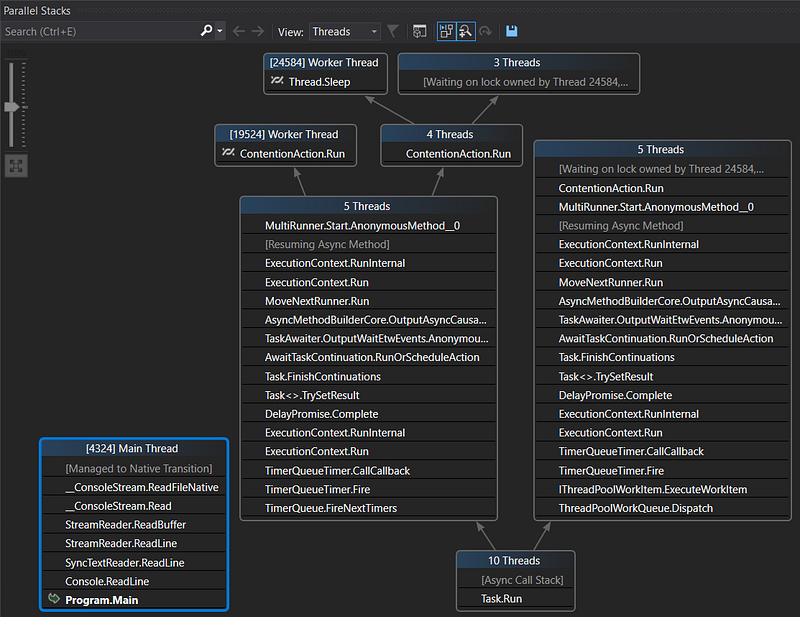
In order to build a “visual” representation, I have to count the number of time each frame appears at the same place in the recorded call stacks. My data structure looks like a tree where each node contains the current frame, the sampling count (as node or as leaf) and a list of different child frames corresponding to the different execution branches:
 1
 2
 3
 4
 5
 6
 7
 8
 9
10
11
| public class MergedSymbolicStacks
{
private int _countAsNode;
private int _countAsLeaf;
public ulong Frame { get; private set; }
public string Symbol { get; private set; }
public int CountAsNode => _countAsNode;
public int CountAsLeaf => _countAsLeaf;
public List<MergedSymbolicStacks> Stacks { get; set; }
|
Each frame contains both the address and the method signature that have been extracted from the callstack retrieved from the events:
 1
 2
 3
 4
 5
 6
 7
 8
 9
10
11
12
13
14
15
16
17
18
19
20
21
22
23
24
25
26
27
28
29
30
31
32
33
34
35
36
37
38
39
| protected void MergeCallStack(TraceCallStack callStack, SymbolReader reader)
{
var currentFrame = callStack.Depth;
var frames = new SymbolicFrame[callStack.Depth];
// the first element of callstack is the last frame: we need to iterate on each frame
// up to the first one before adding them into the MergedSymbolicStack
while (callStack != null)
{
var codeAddress = callStack.CodeAddress;
if (codeAddress.Method == null)
{
var moduleFile = codeAddress.ModuleFile;
if (moduleFile != null)
{
// TODO: this seems to trigger extremely slow retrieval of symbols
// through HTTP requests: see how to delay it AFTER the user
// stops the profiling
if (!_missingSymbols.TryGetValue(moduleFile, out var _))
{
codeAddress.CodeAddresses.LookupSymbolsForModule(reader, moduleFile);
if (codeAddress.Method == null)
{
_missingSymbols[moduleFile] = true;
}
}
}
}
frames[--currentFrame] = new SymbolicFrame(
codeAddress.Address,
codeAddress.FullMethodName
);
callStack = callStack.Caller;
}
_stackCount++;
_stacks.AddStack(frames);
}
|
The MergedSymbolicStack.AddStack() method is doing the real merging. The idea of merging call stacks is to start from the bottom and if the frame has already been seen (at this position), increment its sampling count. If not, remember it before incrementing the count. Look at the next frame and do the same match/remember + increment up to the top of the stack.
Here is an animation of what it would look like on a piece of paper (like the one I wrote down before starting to write the C# implementation :^)

Here is the corresponding C# code to merge a stack (i.e. an array of frames)
 1
 2
 3
 4
 5
 6
 7
 8
 9
10
11
12
13
14
15
16
17
18
19
20
21
22
23
24
25
| public void AddStack(SymbolicFrame[] frames, int index = 0)
{
_countAsNode++;
var firstFrame = frames[index];
// search if the frame to add has already been seen
var callstack = Stacks.FirstOrDefault(s => string.CompareOrdinal(s.Symbol, firstFrame.Symbol) == 0);
// if not, we are starting a new branch
if (callstack == null)
{
callstack = new MergedSymbolicStacks(frames[index].Address, frames[index].Symbol);
Stacks.Add(callstack);
}
// it was the last frame of the stack
if (index == frames.Length - 1)
{
callstack._countAsLeaf++;
return;
}
callstack.AddStack(frames, index + 1);
}
|
Last but not least, the constructors of the class reflect how to (1) create the root instance and (2) each node in the tree:
 1
 2
 3
 4
 5
 6
 7
 8
 9
10
11
12
13
| public MergedSymbolicStacks() : this(0, string.Empty)
{
// this will be the root of all stacks
}
private MergedSymbolicStacks(ulong frame, string symbol)
{
Frame = frame;
Symbol = symbol;
_countAsNode = 0;
_countAsLeaf = 0;
Stacks = new List<MergedSymbolicStacks>();
}
|
The code to render the merged stack
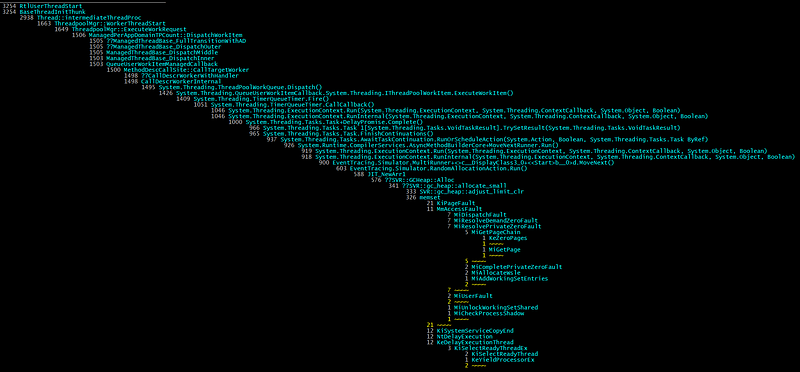
is not that complicated because everything is already in the tree of frames.
 1
 2
 3
 4
 5
 6
 7
 8
 9
10
11
12
13
14
15
16
17
18
19
20
21
22
23
24
25
26
27
28
29
30
31
32
| private static void RenderStack(MergedSymbolicStacks stack, IRenderer visitor, bool isRoot, int increment)
{
var alignment = new string(' ', Padding * increment);
var padding = new string(' ', Padding);
var currentFrame = stack.Frame;
// special root case
if (isRoot)
visitor.WriteCount($"{Environment.NewLine}{alignment}{stack.CountAsNode, Padding} ");
else
visitor.WriteCount($"{Environment.NewLine}{alignment}{stack.CountAsLeaf + stack.CountAsNode, Padding} ");
visitor.WriteMethod(stack.Symbol);
var childrenCount = stack.Stacks.Count;
if (childrenCount == 0)
{
visitor.WriteFrameSeparator("");
return;
}
foreach (var nextStackFrame in stack.Stacks.OrderByDescending(s => s.CountAsNode + s.CountAsLeaf))
{
// increment when more than 1 children
var childIncrement = (childrenCount == 1) ? increment : increment + 1;
RenderStack(nextStackFrame, visitor, false, childIncrement);
if (increment != childIncrement)
{
visitor.WriteFrameSeparator($"{Environment.NewLine}{alignment}{padding}{nextStackFrame.CountAsNode + nextStackFrame.CountAsLeaf, Padding} ");
visitor.WriteFrameSeparator($"~~~~ ");
}
}
}
|
The IRenderer interface implementations are simply changing foreground color depending on what kind of information to display:
I have used the same “Visitor” pattern for the pstack tool/extension for WinDBG.
Not for Admin only#
I always thought that I needed to be a member of the Administrator group and running elevated to be allowed to start a kernel profiling session. Well… This is in fact not the case! You have to dig into the documentation for configuring and starting a SystemTraceProvider session to read the following note:
If you want a non-administrators or a non-TCB process to be able to start a profiling trace session using the SystemTraceProvider on behalf of third party applications, then you need to grant the user profile privilege and then add this user to both the session GUID (created for the logger session) and the system trace provider GUID to enable the system trace provider. For more information, see the EventAccessControl function.
Long story short, you need a user to be part of the Performance Log Users group (makes sense) or grant her the TRACELOG_ACCESS_REALTIME permission. Obviously, you need an administrator account to do both but this can be done once on a machine by your IT in a secure way.
I wrapped a managed implementation of the corresponding code to add the permission in a ProfilingPermission class that hides all the P/Invoke and weird marshalling stuff to the native Windows API. Simply pass a user name to EnableProfileUser() and it should work just fine.
  1
  2
  3
  4
  5
  6
  7
  8
  9
 10
 11
 12
 13
 14
 15
 16
 17
 18
 19
 20
 21
 22
 23
 24
 25
 26
 27
 28
 29
 30
 31
 32
 33
 34
 35
 36
 37
 38
 39
 40
 41
 42
 43
 44
 45
 46
 47
 48
 49
 50
 51
 52
 53
 54
 55
 56
 57
 58
 59
 60
 61
 62
 63
 64
 65
 66
 67
 68
 69
 70
 71
 72
 73
 74
 75
 76
 77
 78
 79
 80
 81
 82
 83
 84
 85
 86
 87
 88
 89
 90
 91
 92
 93
 94
 95
 96
 97
 98
 99
100
101
102
103
104
105
106
107
108
109
110
111
112
113
114
115
116
117
118
119
120
121
122
123
124
125
126
127
128
129
130
131
| public static class ProfilingPermission
{
private const uint TRACELOG_GUID_ENABLE = 0x0080;
private const int NO_ERROR = 0; // ERROR_SUCCESS in C++
private const int ERROR_INSUFFICIENT_BUFFER = 122;
// read https://docs.microsoft.com/en-us/windows/win32/etw/configuring-and-starting-a-systemtraceprovider-session
// for more details
public static void EnableProfilerUser(string accountName)
{
// Kernel provider from https://github.com/microsoft/perfview/blob/master/src/TraceEvent/Parsers/KernelTraceEventParser.cs#L43
Guid kernelProviderGuid = new Guid("{9e814aad-3204-11d2-9a82-006008a86939}");
byte[] sid = LookupSidByName(accountName);
// from https://docs.microsoft.com/en-us/windows/win32/etw/configuring-and-starting-a-systemtraceprovider-session
uint operation = (uint)EventSecurityOperation.EventSecurityAddDACL;
uint rights = TRACELOG_GUID_ENABLE;
bool allowOrDeny = ("Allow" != null);
uint result = EventAccessControl(
ref kernelProviderGuid,
operation,
sid,
rights,
allowOrDeny
);
if (result != NO_ERROR)
{
var lastErrorMessage = new Win32Exception((int)result).Message;
throw new InvalidOperationException($"Failed to add ACL ({result.ToString()}) : {lastErrorMessage}");
}
}
private static byte[] LookupSidByName(string accountName)
{
byte[] sid = null;
uint cbSid = 0;
StringBuilder referencedDomainName = new StringBuilder();
uint cchReferencedDomainName = (uint)referencedDomainName.Capacity;
SID_NAME_USE sidUse;
int err = NO_ERROR;
if (!LookupAccountName(null, accountName, sid, ref cbSid, referencedDomainName, ref cchReferencedDomainName, out sidUse))
{
err = Marshal.GetLastWin32Error();
if (err == ERROR_INSUFFICIENT_BUFFER)
{
sid = new byte[cbSid];
referencedDomainName.EnsureCapacity((int)cchReferencedDomainName);
err = NO_ERROR;
if (!LookupAccountName(null, accountName, sid, ref cbSid, referencedDomainName, ref cchReferencedDomainName, out sidUse))
err = Marshal.GetLastWin32Error();
}
}
if (err != NO_ERROR)
{
var lastErrorMessage = new Win32Exception(err).Message;
throw new InvalidOperationException($"LookupAccountName fails ({err.ToString()}) : {lastErrorMessage}");
}
// display the SID associated to the given user
IntPtr ptrSid;
if (!ConvertSidToStringSid(sid, out ptrSid))
{
err = Marshal.GetLastWin32Error();
var lastErrorMessage = new Win32Exception(err).Message;
Console.WriteLine($"No SID string associated to user {accountName} ({err.ToString()}) : {lastErrorMessage}");
}
else
{
string sidString = Marshal.PtrToStringAuto(ptrSid);
ProfilingPermission.LocalFree(ptrSid);
Console.WriteLine($"Account ({referencedDomainName}){accountName} mapped to {sidString}");
}
return sid;
}
[DllImport("Sechost.dll", SetLastError = true)]
static extern uint EventAccessControl(
ref Guid providerGuid,
uint operation,
[MarshalAs(UnmanagedType.LPArray)] byte[] Sid,
uint right,
bool allowOrDeny // true means ALLOW
);
[DllImport("kernel32.dll")]
static extern IntPtr LocalFree(IntPtr hMem);
[DllImport("advapi32.dll", SetLastError = true)]
static extern bool LookupAccountName(
string systemName,
string accountName,
[MarshalAs(UnmanagedType.LPArray)] byte[] Sid,
ref uint cbSid,
StringBuilder referencedDomainName,
ref uint cchReferencedDomainName,
out SID_NAME_USE nameUse);
[DllImport("advapi32.dll", CharSet = CharSet.Auto, SetLastError = true)]
static extern bool ConvertSidToStringSid(
[MarshalAs(UnmanagedType.LPArray)] byte[] pSID,
out IntPtr ptrSid); // can't be an out string because we need to explicitly call LocalFree on it;
// the marshaller would call CoTaskMemFree in case of a string
// from http://pinvoke.net/default.aspx/advapi32/LookupAccountName.html
enum SID_NAME_USE
{
SidTypeUser = 1,
SidTypeGroup,
SidTypeDomain,
SidTypeAlias,
SidTypeWellKnownGroup,
SidTypeDeletedAccount,
SidTypeInvalid,
SidTypeUnknown,
SidTypeComputer
}
// from evntcons.h
enum EventSecurityOperation
{
EventSecuritySetDACL = 0,
EventSecuritySetSACL,
EventSecurityAddDACL,
EventSecurityAddSACL,
EventSecurityMax
} // EVENTSECURITYOPERATION
}
|
You are now ready to profile your application memory allocation patterns and CPU consumption!
Thanks for checking in with us again on our C# series. Like what you are reading? Head over to our latest blog posts on the topic:
Build your own .NET memory profiler in C#
*This post explains how to collect allocation details by writing your own memory profiler in C#.*medium.comBuild your own .NET memory profiler in C# — call stacks (2/2–1)
*This post explains how to get the call stack corresponding to the allocations with CLR events.*medium.com
If you are interested in joining our team, check out our open positions and apply today!
Careers at Criteo | Criteo jobs
*Find opportunities everywhere. Choose your next challenge. Find the job opportunities at Criteo in Product, research &…*careers.criteo.com

