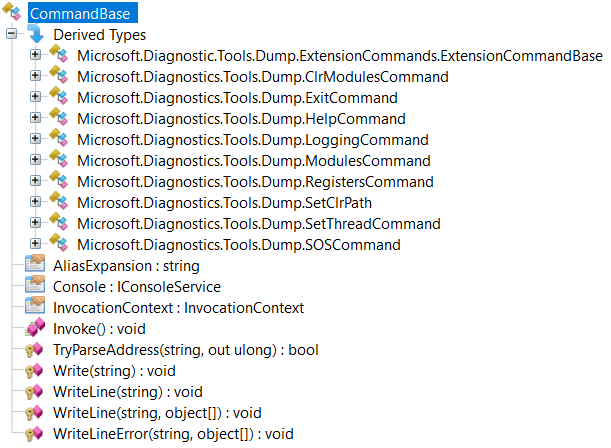
In the previous post, I presented the new commands that were added to dotnet-dump and how to use them. It is now time to show how to implement such a command.
But before jumping into the code, you should first ensure that you have a valid use case that the Diagnostics team is not currently working on. I recommend to create an issue in the Diagnostics repository to explain what is missing for which scenario and propose to implement the corresponding command.
What is a dotnet-dump command?
Here is the directory structure related to the dotnet-dump tool in the Diagnostics repository:
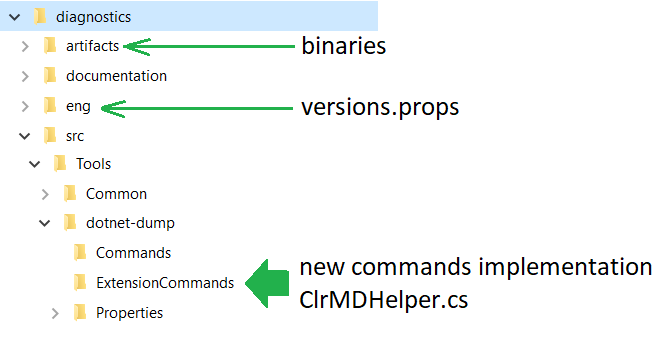
The built binaries are generated under artifacts\bin\dotnet-dump<Release or Debug>\netcoreapp2.1 folder if you need to test them outside of Visual Studio.
The eng folder contains the versions.props file that lists the versions for nuget dependencies. In my case, I had to reference the ParallelStacks.Runtime nuget so I added the following line:2.0.1
And in the dotnet-dump.csproj, this nuget is referenced with the same variable: `
Missed the first part of the story? Read it here:
Want to work with Christophe or other teams? Check out our open positions:
Careers at Criteo | Criteo jobs *Find opportunities everywhere. Choose your next challenge. Find the job opportunities at Criteo in Product, research &…*careers.criteo.com
