This post of the series shows how to generate GC logs in .NET Core with the new event pipes architecture and details the events emitted by the CLR during a collection.
Part 1: Replace .NET performance counters by CLR event tracing.
Part 2: Grab ETW Session, Providers and Events.
Part 3: CLR Threading events with TraceEvent.
Part 4: Spying on .NET Garbage Collector with TraceEvent.
Part 5: Building your own Java GC logs in .NET
Introduction
The previous episode of the series introduced the notion of “GC log”, well known in the Java world and how to implement it in .NET thanks to ETW and TraceEvent on Windows. This solution is easy but requires to create an ETW session (and to remember to close it)… and is also not supported on Linux. However, .NET Core 2.2 introduced the EventListener class as the best way to receive CLR events both on Windows and Linux but only from inside the process itself. As of today, TraceEvent is not supporting live session with EventPipe/EventListener, only a file-based constructor is available. This is unfortunate because it means that you can’t rely on the huge work done by TraceEvent to parse the CLR events; especially those related to garbage collections. The rest of the post will explain how to decipher raw events.
In addition, there is a bigger problem: the current .NET Core 2.2 implementation is not working for all CLR events. Long story short, the EventPipe class relies on specific Thread Local Storage slot that is not set by GC background worker threads: the events are not emitted in that case. In addition, there is no per event timestamp information in 2.2. The implementation presented in this post relies on tests done with ETW traces and on the Pull Request that fixes the issue for .NET Core 3.0, available in Preview 5.
Back to the basics: what events are emitted by the GC?
The previous posts of the series were based on C# events raised by the TraceEvent parser with names different from the original CLR events and the corresponding Microsoft Docs. When you implement your EventListener-derived class, each event is received as an EventWrittenEventArgs object in the OnEventWritten override. The EventId and EventName properties allow you to figure out which event is received. If you have worked with TraceEvent before, you might be using the Opcode property but even if a property with the same name exists in EventWrittenEventArgs, the value is completely different and should not be used.
The CLR is versioning the emitted events to be able to add information over time. For example, the EventId of the “GCStart” event is 1 but the EventName could be GCStart, GCStart_V1 or GCStart_V2 even though the Microsoft Docs seems to be stuck on version 1. The following table lists the interesting GC events for .NET Core 2.2/3.0:
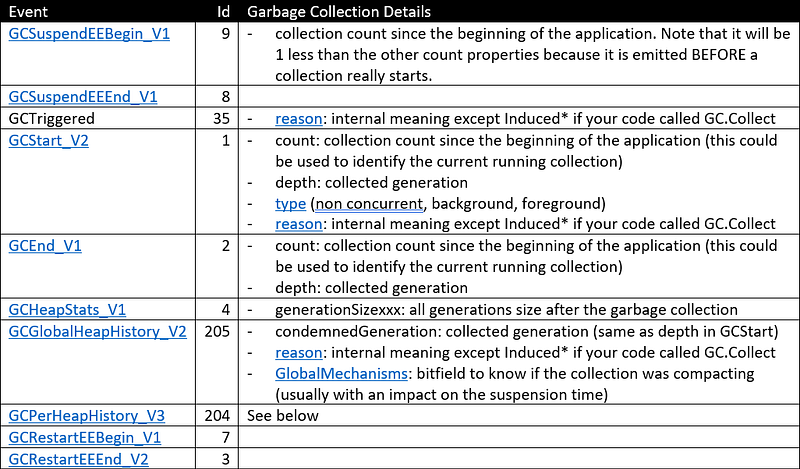
Look at the documentation related to each event.
If you go back to this previous article of the series, you notice that all details provided by the TraceGC argument are available except for the objects size before and after the collection. These values are embedded in the workload of the GCPerHeapHistory event by the GC code. Unfortunately, these details are not marshalled by the current EventPipe implementation to your OnEventWritten override (read https://github.com/dotnet/coreclr/issues/24506 for more details and when it will be fixed).
There is no strongly typed EventArgs per event and you need to know the name of the field you are interested in to get its index. From this index, you get its corresponding value from the Payload property of the received EventWrittenArgs. The following helper method is doing the heavy lifting for you:
| |
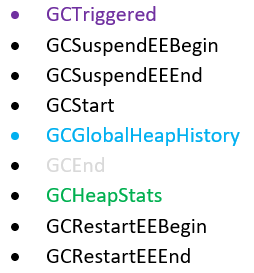
Now that all interesting events are known, it is time to figure out what is the sequence of events emitted during a garbage collection: a new line with the details should be added to the GC log file when the last event is received.
What is the exact sequence of GC events
So let’s go back to the main phases of a garbage collection with the related CLR events as shown in the following figure (with Konrad Kokosa courtesy from his book)
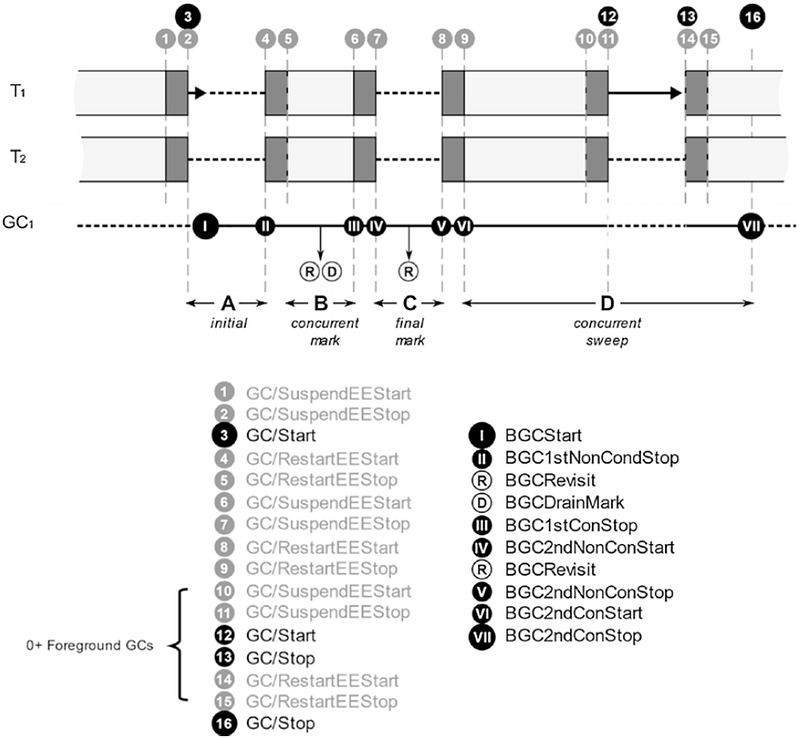
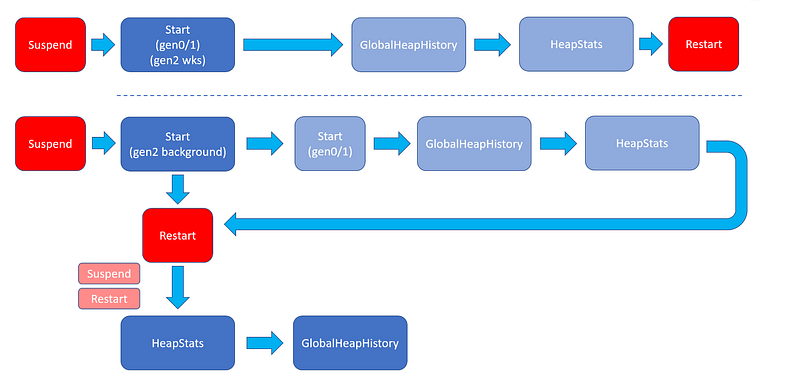
This is the expected events for the most complicated case: a background collection with possible foreground ephemeral (gen0 and gen1) collections while the GC threads are concurrently sweeping. However, it is not possible to rely on this specific order of events because the order changes, depending on workstation/background mode and generation 2/ephemeral. Each type of collection triggers events in different order as shown below:
Gen0/Gen1 and Gen 2 (non concurrent)
Gen 2 (background)
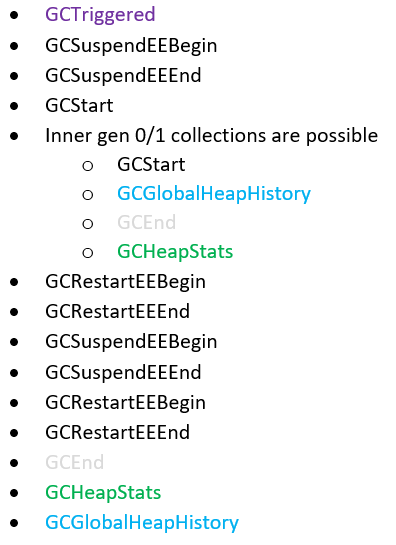
Here is a more visual view of what could happen (dark blue is gen 2 and light blue are ephemeral gen0/1):

When exactly does a GC start…
The GCTriggered event notifies that a new collection will start except in the case of foreground ephemeral gen0/gen1 collections triggered during a background gen2. In that case, you could rely on the GCStart event and check if a background gen2 is running. This GCStart event provides the condemned generation in its Depth property. So I keep track of both the current background GC (if any) and the foreground GC (if any) in a GCInfo object:
| |
The GCDetails class keeps tracks of all the details gathered during a garbage collection:
| |
The HeapDetails stores the size of each generation after a collection:
| |
The GCDetails instance is created when the GCStart event is received:
| |
This is where it is important to remember if either a background or foreground GC is starting. In the former case, the CurrentBGC field is set and the GCInProgress field is set otherwise with a new GCDetails instance.
That way, when either of GCGlobalHistory or GCHeapStarts is received, it is easy to know what is the GC in progress; i.e. if a foreground GC is in progress, an event happens in its context (until the last one **GCHeapStats **that will clean the GCInProcess field):
| |
… suspend, pause application threads and end of ephemeral collections
The suspension and pause time are not that complicated to compute. The garbage collector code is relying on the SuspendEE and RestartEE methods provided by the .NET Execution Engine to suspend and restart the application threads respectively. Each of these methods emits a pair of GCxxxBegin and GCxxxEnd events. After GCSuspendEEBegin is emitted, the Execution Engine waits for the application threads to suspend their execution. When all threads are suspended, GCSuspendEEEnd gets emitted.
The GCRestartEEBegin event is emitted when the applications threads begin to resume their execution. When all application threads are resumed, GCRestartEEEnd gets emitted. The elapsed time between the GCSuspendEEEnd and GCRestartEEBegin events is counted as suspension time. However, for simplicity sake, my current implementation sums both the time spent by the Execution Engine to suspend the threads and the pause time due to the GC work.
The suspension start time is kept in GCInfo:
| |
It will be set when the GCSuspendEEBegin event is received:
| |
This implementation decision does not provide the same level of suspension details (no fine grain suspension time for inner foreground collections) as the one provided by the TraceEvent parsing.
The sibling GCRestartEEEnd event is used to (1) compute the total pause time and (2) detect when gen0/gen1/non concurrent gen2 collections end:
| |
Detect other collections end (and more details)
As shown in the events workflow figure, the GCRestartEEBegin/GCRestartEEEnd duo of events are used to detect the end of non-concurrent gen0/1/2 collections. It is more complicated to detect the end of a gen2 background or inner ephemeral gen0/1 collections: GCGlobalHeapHistory for the former and GCHeapStats for the latter. However, these two events payload does not contain the piece of information to know if we are in a middle of a background gen 2 or not. With this details in mind, the code of the different event handlers is quite straightforward.
The generations size are retrieved from the GCHeapStat event:
| |
Remember this is the last event received for a gen0/gen1/foreground gen2 collection so I’m using it to clear the GCInProgress field: the next event will be for the current background gen2 if any (CurrentBGC field is not null) or a new collection.
As of today with Preview 5, the before/after generation sizes are not marshalled through event pipes (see the corresponding bug for more details) so the **GCPerHeapHistory **event does not bring any value.
The last GCGlobalHeapHistory event of background gen 2 collection is also used to detect compaction:
| |
In case of a background gen 2, this is the last event so there should not be any collection in progress:
| |
The next received event will start a new garbage collection cycle of events.
This post concludes the series about CLR events and how to use them to better understand how the runtime is behaving under the workloads of your applications. The code available on Github has been updated to provide the EventListenerGcLog class that uses the code demonstrated in this post to generate GC logs with event pipes.
