
Profile picture

Welcome to Christophe Nasarre’s Blog

I write about .NET internals, garbage collection, diagnostics and performance.

How to support .NET Framework PDB format and source line with ISymUnmanagedReader

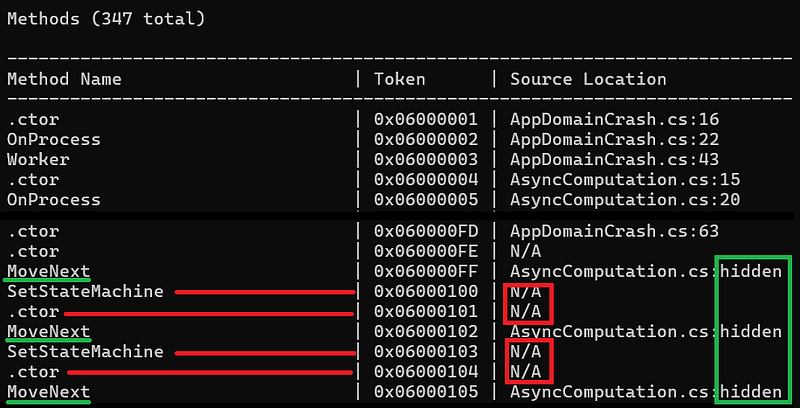
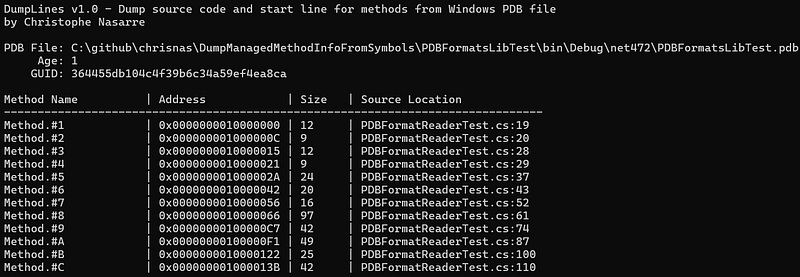
In my previous posts, I explained how to use DIA and DbgHelp to map a method to its line in source code. I forgot to mention that it was correct for .NET Core but not for the “old” .NET Framework Windows PDB format. Instead of encoding the method token in the name, the symbol file contains the name of the methods. So, how to do the mapping for .NET Framework assemblies? You will find the answer (plus some tricks) in this article. ...

February 11, 2026 · 6 min · Christophe Nasarre

But where is my method code? DbgHelp comes to the rescue

Introduction In our Datatog continuous .NET profiler implementation, we collect the call stack of a thread when something interesting happens such as an exception is thrown for example. In addition to the method name we would like to figure out at what line in which source code file this method is implemented. This information is usually stored in the program database (.pdb) file that is generated by the compiler when the assembly is generated from the source code. The type and the name of the method are stored in the metadata of the assembly itself but I already told this story before. The .NET compilers support two formats of .pdb: the Portable format for .NET Core and the Windows format for .NET Framework. ...

January 16, 2026 · 7 min · Christophe Nasarre

How to dump function symbols from a .pdb file

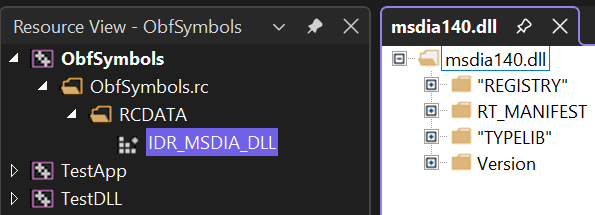
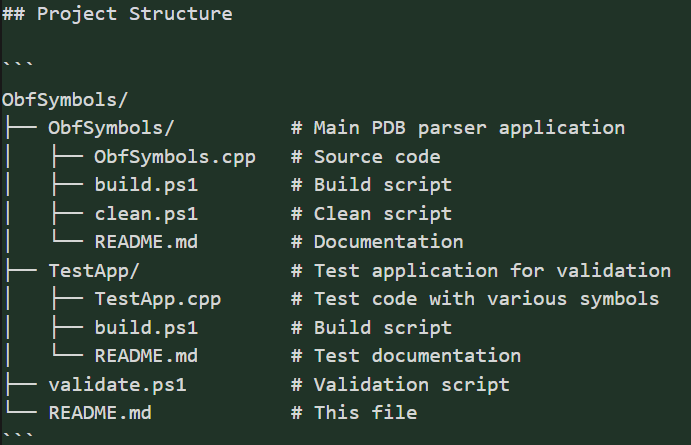
During this R&D week at Datadog, I wanted to implement a tool accepting a .pdb file and generate a .sym file listing functions symbols with their address, size, name with signature and if they are public or private. This post dig into the implementation details of using Microsoft Debug Interface Access (DIA) COM API to achieve these objectives. If you want to see what my vibe coding experience in Cursor was, read this other post instead. ...

December 8, 2025 · 8 min · Christophe Nasarre

Vibe coding a .pdb dumper or how I became a Product Manager

During this R&D week at Datadog, I wanted to implement a tool accepting a .pdb file and generate a .sym file listing functions symbols with their address, size, name with signature and if they are public or private. This post dig into the implementation details of using Microsoft Debug Interface Access (DIA) COM API to achieve these objectives. If you want to see what my vibe coding experience in Cursor was, read this other post instead. ...

December 8, 2025 · 8 min · Christophe Nasarre

How to monitor .NET applications startup

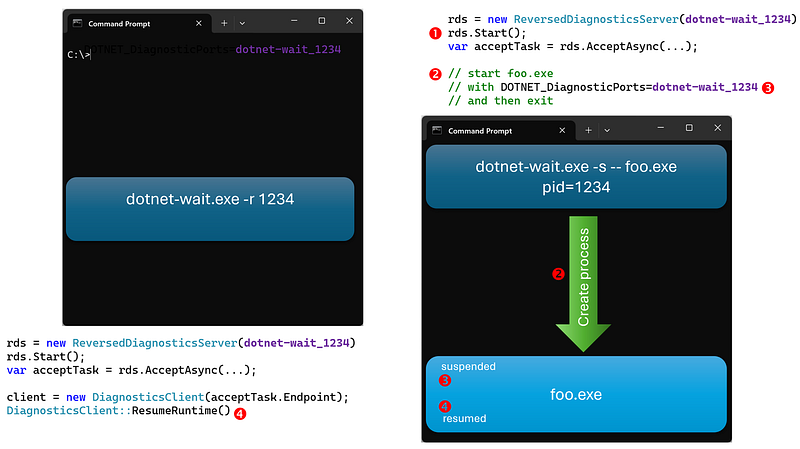
In the previous article, I presented what is needed (i.e. listen to WaitHandleWait events) to compute lock/wait durations and call stacks for Mutex, Semaphore, SemaphoreSlim, Manual/AutoResetEvent, ManualResetEventSlim, ReaderWriterLockSlim .NET synchronization constructs for a running process. However, since the application is already running, some JIT-related events are missing, and some frames of the call stacks cannot be symbolized. Also, it would be great to monitor an application’s startup to see if it could be faster. ...

March 13, 2025 · 5 min · Christophe Nasarre

Measuring the impact of locks and waits on latency in your .NET apps

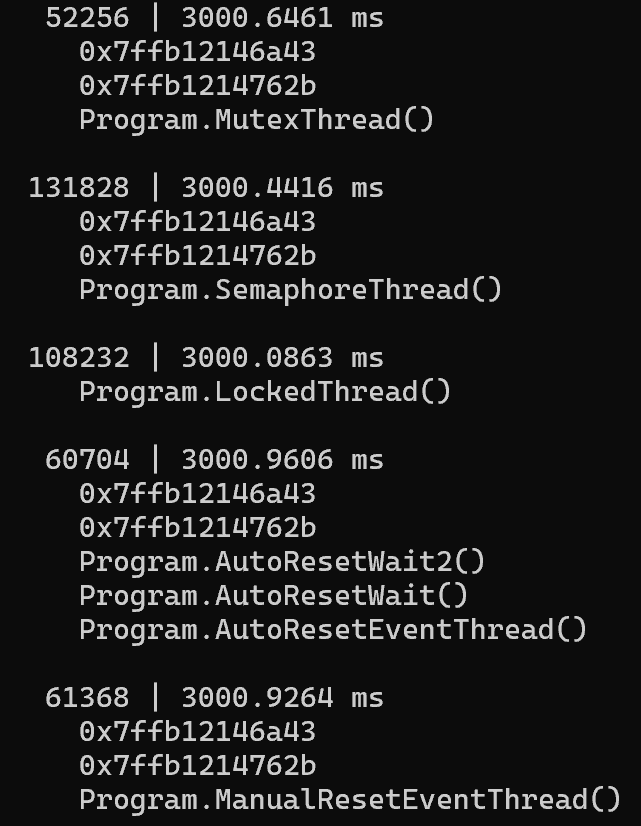
Introduction In an old post, I detailed how to use ContentionStart and ContentionStop events to measure the lock contentions duration for a .NET application. In a .NET 9 pull request, a former Criteo’s colleague Grégoire Verdier has added new events to be notified when wait time similar to lock contention is happening for Mutex, Semaphore, Manual/AutoResetEvent. Read his post for more details about what he was trying to investigate. With asynchronous and multi-threaded algorithms, it is essential to detect unexpected wait/locks in our applications. This post shows you how to leverage these events to measure the duration of these waits and get the call stack when the wait started: ...

January 13, 2025 · 7 min · Christophe Nasarre

Monitor HTTP redirects to reduce unexpected latency

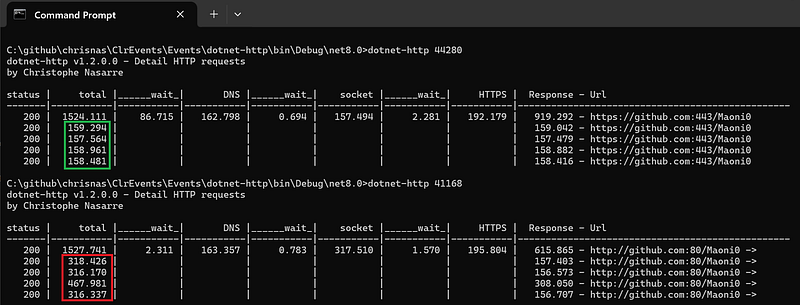
In the previous post, I detailed how I used the undocumented events from the BCL to create the dotnet-http CLI tool to monitor your outgoing HTTP requests. After testing with older versions of .NET, I realized that the code needed to be updated and I’m sharing my findings in this post. The main point is that url redirections could have a major impact on requests latency: Always test supported versions… When I wrote the initial version of dotnet-http, I only tested it with .NET 8 and .NET 9 with limited formats of urls. Unfortunately, things went bad when I tried to monitor applications running on .NET 5 and .NET 6: no events are emitted by these versions of the BCL. ...

December 13, 2024 · 7 min · Christophe Nasarre

Implementing dotnet-http to monitor your HTTP requests

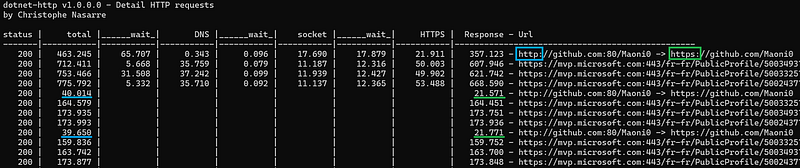
The previous episode detailed how to find the events dealing with network requests that are emitted by the BCL classes with their undocumented payload. It is now time to see how to listen to them and extract valuable insights such as what is happening when an HTTP request is sent to a server as an example. This is how my new dotnet-http CLI tool is implemented. You are now able to see the cost of DNS, socket connection, security and redirection as shown in the following screenshot. ...

November 13, 2024 · 10 min · Christophe Nasarre

Digging into the undocumented .NET events from the BCL

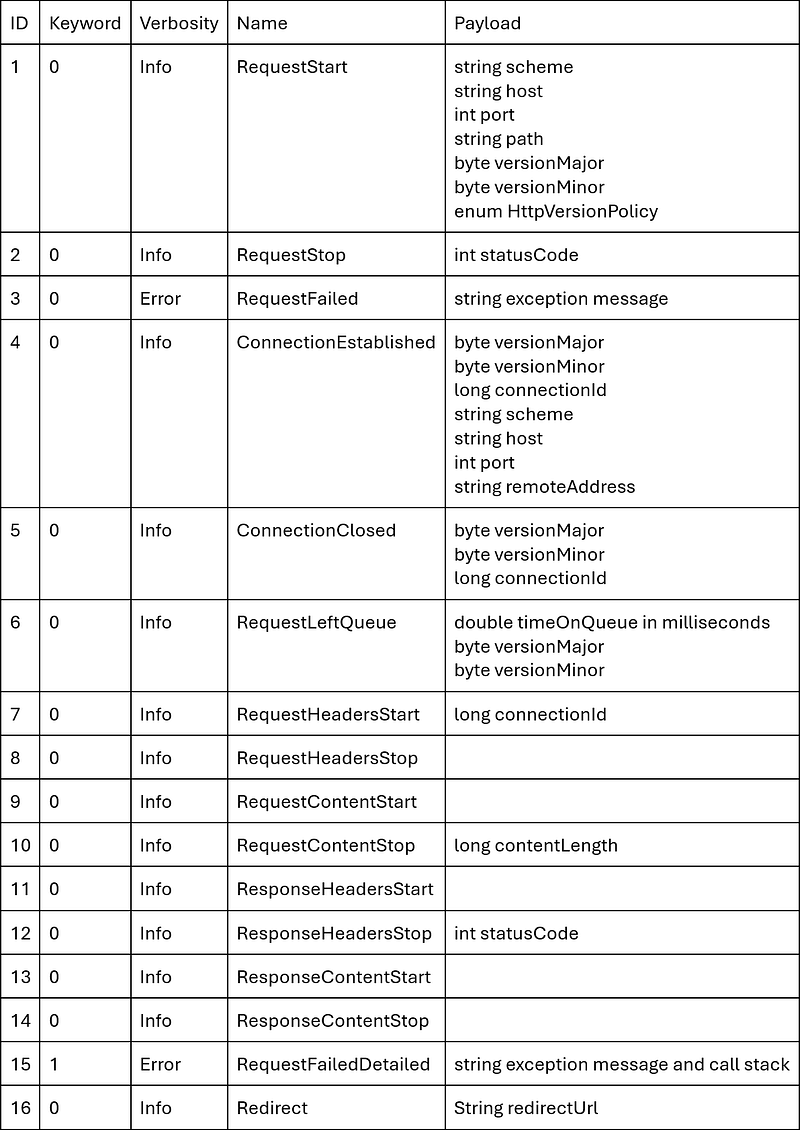
I’ve presented in depth the events emitted by the CLR in many posts to get insightful details about how the .NET runtime is working (lock contention, GC, allocations, …). Some .NET features are not implemented at the runtime level but at the Base Class Library (a.k.a. BCL) level. For example, if you are using HttpClient, you might want to measure how long it takes to get the response to your HTTP requests. ...

October 13, 2024 · 3 min · Christophe Nasarre

Unexpected usage of EventSource or how to test statistical results in CLR pull request

Testing the statistical results In parallel of the performance impact, it is important to validate the expected statistical distribution of the sampled allocations. Basically, I need to execute the same run of allocations multiple times in a row. Each run allocates the same number of instances of different types. For example, it is interesting to know if sampling instances of types with sizes proportional to a base value gives good results. Same question for totally different sized types or with Finalizers. ...

September 13, 2024 · 7 min · Christophe Nasarre

Tips and tricks from validating a Pull Request in .NET CLR

Introduction During the implementation of our .NET allocation profiler, we realized that the current sampling mechanism based on a fixed threshold did not provide a good enough statistical distribution. With the help of Noah Falk from the CLR Diagnostics team, I started to implement a randomized sampling based on a Bernoulli distribution model for .NET. With this kind of changes, you need to ensure that you don’t break any existing code, the impact on performance is limited and the mathematical results map the expected mathematical distribution. ...

August 13, 2024 · 7 min · Christophe Nasarre

Trigger your GCs with dotnet-fullgc!

Introduction If you have read Microsoft documentation, you probably know that it is not recommended to trigger a garbage collection in your application code. However, in some troubleshooting cases, you might want to trigger a GC. For example, you don’t want to wait for a full gen2 compacting GC to figure out if your application is really leaking memory. For web applications, you can imagine having a hidden HTTP end point that simply call GC.Collect. What if you could simply call a command line tool to trigger a GC in any .NET application? This is exactly what my new dotnet-fullgc CLI tool is doing! ...

May 22, 2024 · 5 min · Christophe Nasarre

View your GCs statistics live with dotnet-gcstats!

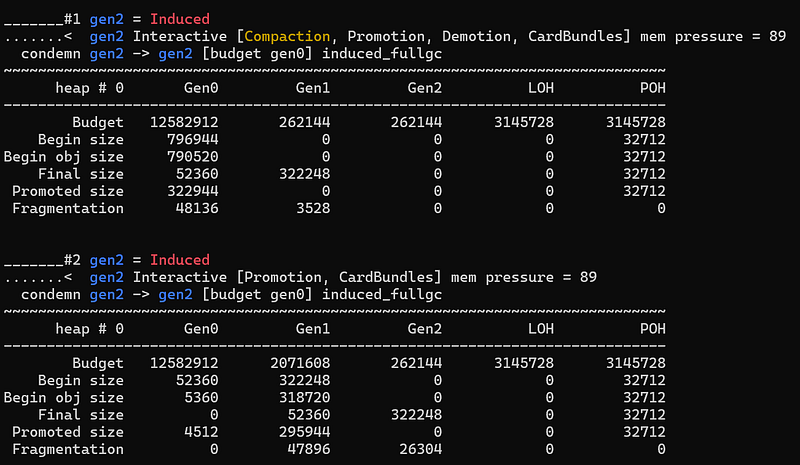
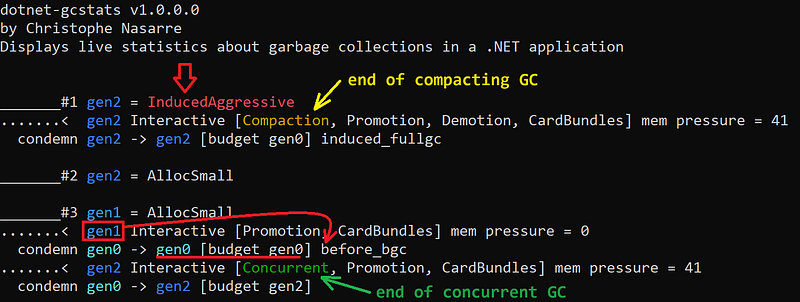
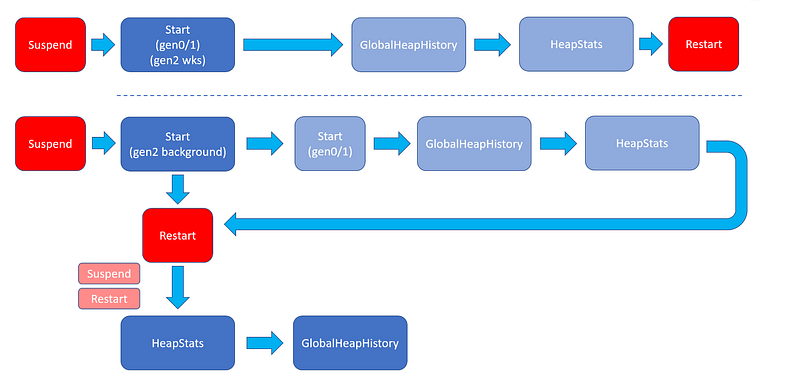
Introduction While working on the second edition of Pro .NET Memory Management, it was needed to get statistics about each garbage collection to explain the condemned generation and other decisions taken by the GC. This post explains the different internal data structures used by the GC and how to get their value for each collection. Some require debugging the CLR and others are emitted via events. For the latter, I will show how I wrote the new dotnet-gcstats CLI tool to collect them and a personal Perfview GCStats displaying live data, garbage collection after garbage collection. ...

March 1, 2024 · 7 min · Christophe Nasarre

Be Aligned! Or how to investigate a stack corruption

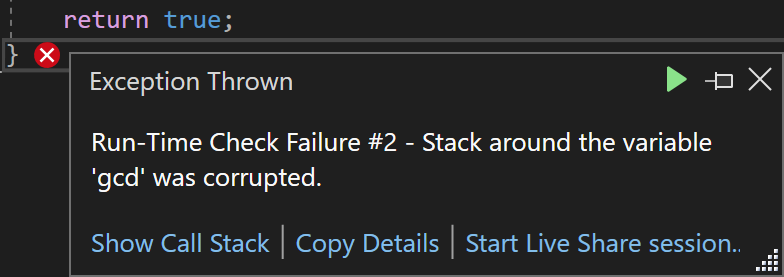
Introduction During the Datadog R&D week, my goal is to mimic the generation of a .gcdump from our .NET profiler. I’ve already written most of the code for a previous post and after changing the required plumbing, it is time to test the workflow. Unfortunately, I’m facing the dreaded stack corruption dialog: The rest of the post explains the different steps I’m following to investigate this issue. Trying to understand the problem This stack check is done by the debug version of the C Runtime library by basically adding some special bytes on the stack before calling a function and checking these bytes are not tampered when returning from the call. ...

December 11, 2023 · 5 min · Christophe Nasarre

How to dig into the CLR

Introduction When I started to work on the second edition of Pro .NET Memory Management : For Better Code, Performance, and Scalability by Konrad Kokosa, I already spent some time in the CLR code for a couple of pull requests related to the garbage collector. However, updating the book to cover 5 new versions of .NET requires looking at new APIs but also digging deep inside the CLR (and especially the GC) hundreds of thousand lines of code! ...

November 12, 2023 · 6 min · Christophe Nasarre

Crap: the application is randomly crashing!

Introduction When you have a call with a customer who explains to you that his application is crashing when your profiler is enabled, it is never a great experience. This post is listing which steps were followed to investigate such an issue I faced last week; from the basics up to the final in analysing memory dumps in WinDbg. Get as many setup details as possible The situation was the following: ...

October 2, 2023 · 6 min · Christophe Nasarre

.NET .gcdump Internals

The .NET runtime (both .NET Framework and .NET Core) allows you to generate a lightweight dump containing the allocated type instances count and references including roots. They are usually generated into .gcdump files by tools such as Perfview or dotnet-gcdump and can also be viewed in Visual Studio. In addition to a view of the allocated types in the managed heap, these files are often used during memory leak investigations because they are much smaller than full memory dump and they contain explicit dependency information between types up to their roots. ...

August 11, 2023 · 8 min · Christophe Nasarre

Raiders of the lost root: looking for memory leaks in .NET

Introduction It’s been almost 12 years since I wrote LeakShell to help me automate the search of memory leaks in .NET. The idea was simple: compare 2 memory dumps of a leaking .NET application to show the types with increasing instances count. Today, you could use Visual Studio Memory Usage tool to do the same but with a much better user interface! The additional killer feature is the ability to see the references chain that explains why a “leaky” object stays in memory. ...

May 8, 2023 · 8 min · Christophe Nasarre

From Metadata to Event block in nettrace format

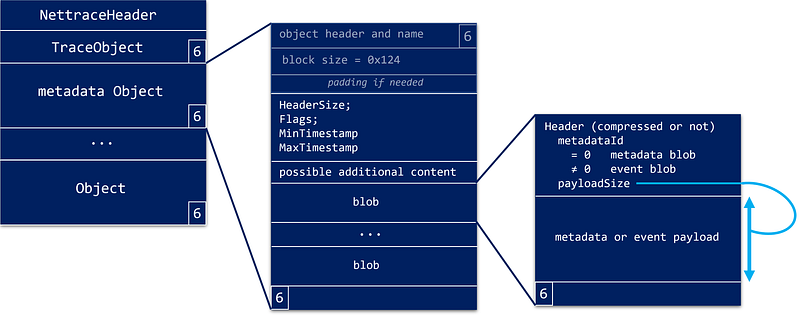
The previous episodes started the parsing of the “nettrace” format used when contacting the .NET Diagnostics IPC server, initiate the protocol to receive CLR events and start to parse stacks. This last episode covers the Metadata and Event blocks. In terms of format, both Metadata and Event blocks share the same memory layout: The common EventBlockHeader starts the block: 1 2 3 4 5 6 7 8 9 10 #pragma pack(1) struct EventBlockHeader { uint16_t HeaderSize; uint16_t Flags; uint64_t MinTimestamp; uint64_t MaxTimestamp; // some optional reserved space might be following }; The timestamp fields give the time of the first and last event in the block. The HeaderSize fields is important because additional information can be stored in the header. Since I have no idea what could be stored there, I simply skip it: ...

March 10, 2023 · 12 min · Christophe Nasarre

Reading “object” in memory — starting with stacks

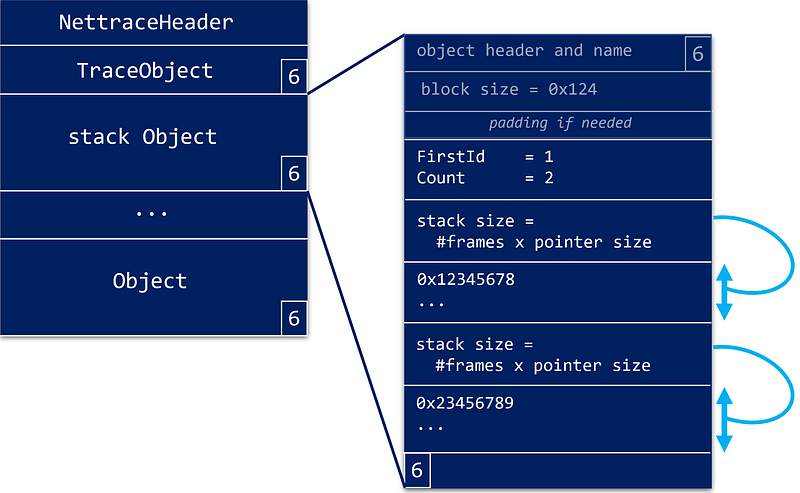
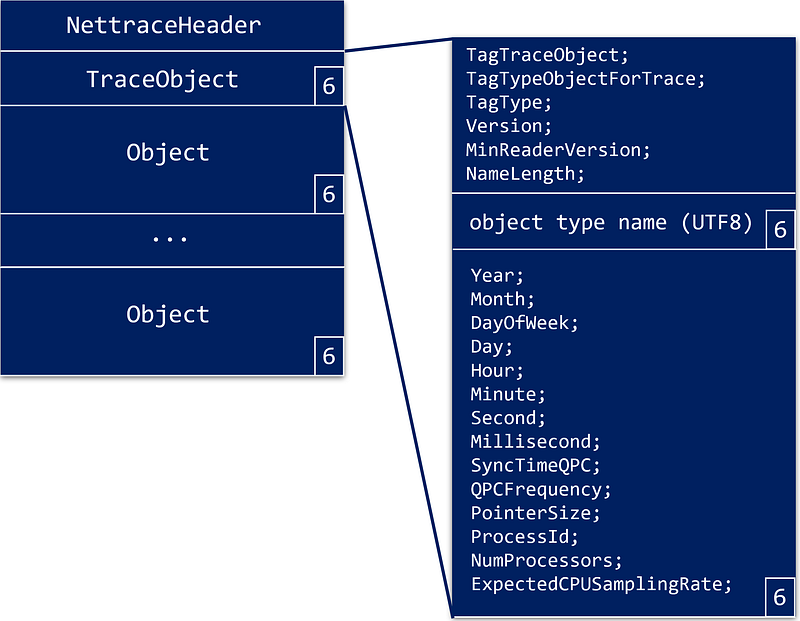
The previous episodes started the parsing of the “nettrace” format used when contacting the .NET Diagnostics IPC server and initiate the protocol to receive CLR events. It is now time to see how to get the payload of each “object” type, especially how stacks are stored. We have seen that the stream starts with a TraceObject that describes the rest of the stream followed by a sequence of “object”: The remaining of each “object” is a 32 bit block size followed by the payload. ...

January 15, 2023 · 7 min · Christophe Nasarre

Parsing the “nettrace” stream of (not only) events

The previous episodes explained how to contact the .NET Diagnostics IPC server and initiate the protocol to receive CLR events. It is now time to dig into the “nettrace” stream format! As the IPC command documentation states, the response to the CollectTracing command is followed by an Optional Continuation of a nettrace format stream of events. In fact, before .NET Core 3, the netperf format was used but I will focus on the nettrace format also used in .NET 5+. ...

November 27, 2022 · 7 min · Christophe Nasarre

CLR events: go for the nettrace file format!

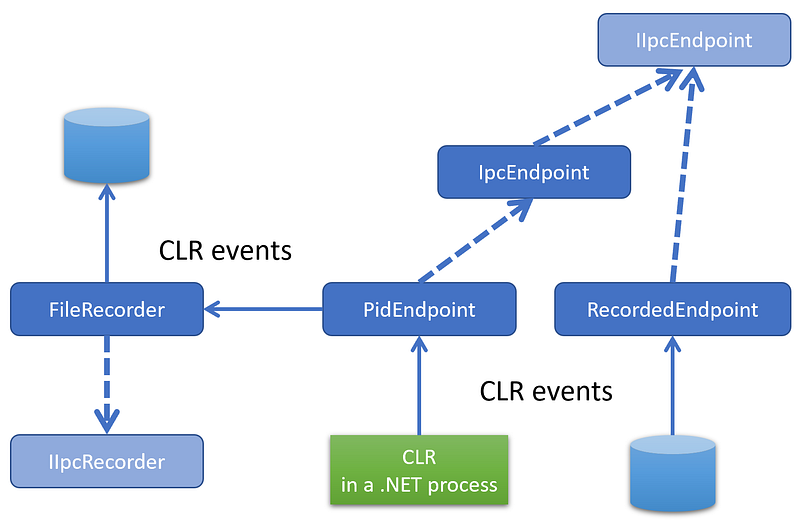
As shown in the previous post, the processing of ProcessInfo diagnostic commands is easy because you send a request and read the different fields from the response. This is different if you want to receive events from the CLR via EventPipe. In C#, the TraceEvent nuget package wraps everything under a nice event handler based model as shown in many of my previous posts. Behind the scene, a StartSession command is sent (more details about the parameters later) and the response contains the numeric ID of the session. Then, the events will be read from the IPC channel as a binary stream of data with the “nettrace“ file format. The collection ends when the StopTracing command is sent. ...

October 23, 2022 · 8 min · Christophe Nasarre

.NET Diagnostic IPC protocol: the C++ way

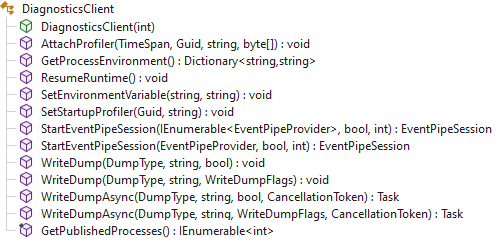
The previous post was describing the C# helpers to communicate with the diagnostic server in the CLR of a running .NET application. If, like me, you must write native code (i.e not in C#), you will need to implement the transport and protocol yourself. And, as you will see, it is not that complicated thanks to the documentation but also by using the available C# code of the Microsoft.Diagnostics.NETCore.Client implementation as a guide. ...

September 18, 2022 · 7 min · Christophe Nasarre

Digging into the CLR Diagnostics IPC Protocol in C#

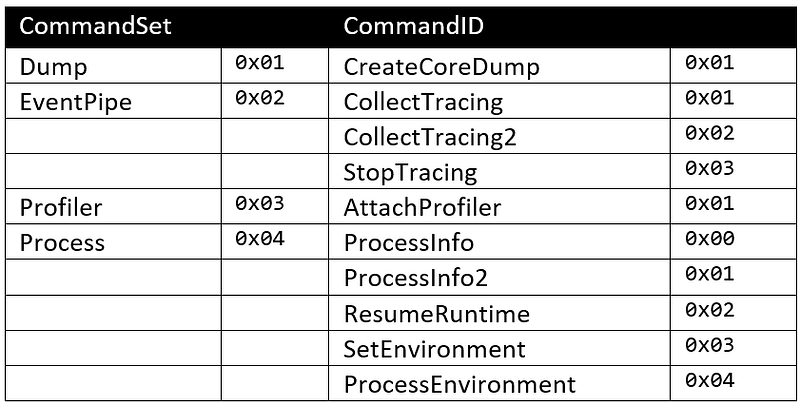
Introduction As I explained during a DotNext conference session, the .NET CLI tools such as dotnet-trace, dotnet-counter or dotnet-dump are communicating with the CLR thanks to Named Pipe on Windows and Domain Socket on Linux. Within the CLR, a diagnostic server thread is responsible for answering requests. A communication protocol allows a tool to send commands and expect responses. This Diagnostic IPC Protocol is pretty well documented in the dotnet Diagnostics repository. Before going into the protocol details, here is a list of the available commands and their effect: ...

July 28, 2022 · 4 min · Christophe Nasarre

Troubleshooting CPU and exceptions issues with Datadog toolbox

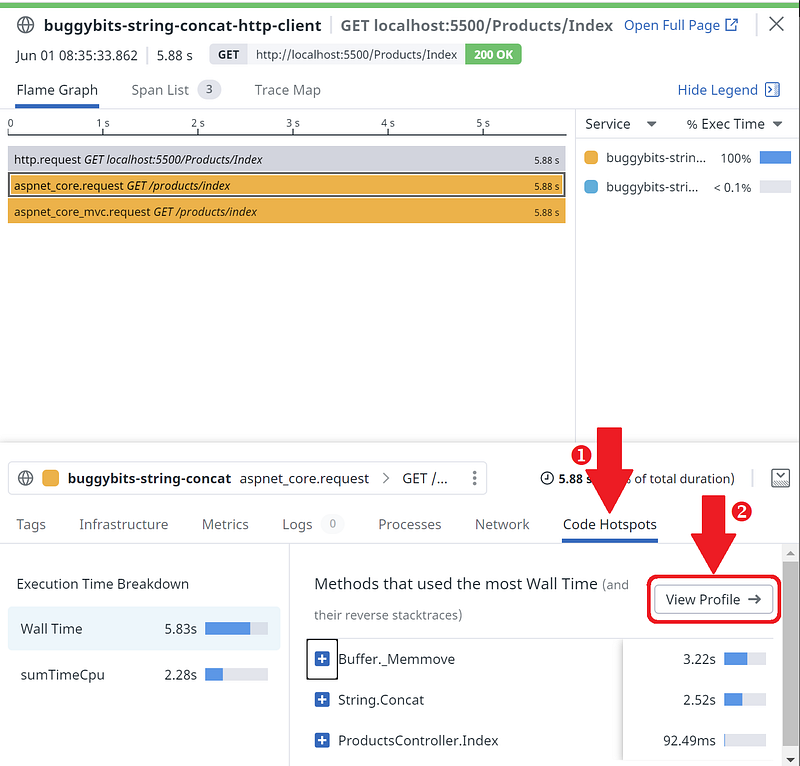
Introduction With the new 2.10 release of the Datadog .NET Tracer and Continuous Profiler available, it is time to update some investigation workflows I already introduced. New features have been added to help you diagnose performance issues in your .NET applications: Linux support! Code Hotspots: allow you to automatically navigate from lengthy spans and requests to profiles CPU profiling: pinpoint high CPU consuming methods Exceptions profiling: identify exceptions distributions Profile sequence: easily profile an application startup The goal of this post is to show you how all these features make your investigations easier. I would recommend reading the previous post; especially for the environment setup that I won’t repeat here. ...

June 9, 2022 · 6 min · Christophe Nasarre

Value types and exceptions in .NET profiling

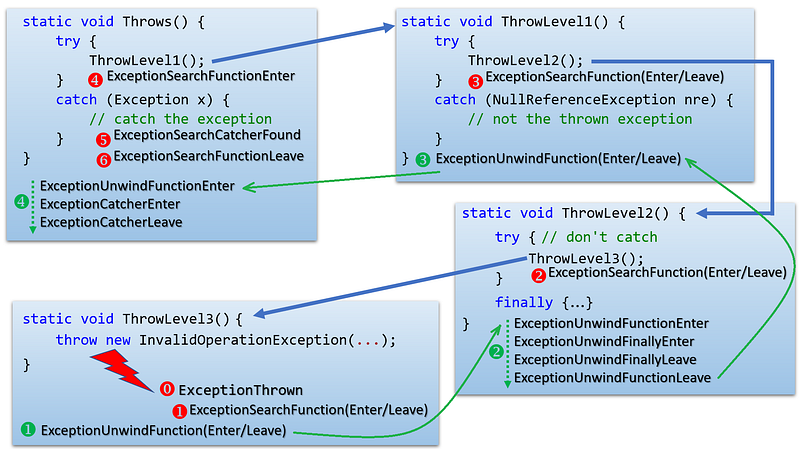
Here comes the end of the series about .NET profiling APIs. This final episode describes how to get fields of a value type instance and how to deal with exceptions. Getting fields of a value type instance The case of a value type is very similar to a reference type except that the address you receive points directly to the beginning of the fields value; instead of the type MethodTable (or ObjectID if you prefer). ...

March 14, 2022 · 7 min · Christophe Nasarre

Troubleshooting .NET performance issues with Datadog toolbox

Introduction The beta of Datadog .NET Continuous Profiler is available! This is a great opportunity to show how to use the different tools provided by Datadog to troubleshoot .NET applications facing performance issues. Tess Ferrandez updated her famous BuggyBits application to .NET Core. Among the different available scenarios, let’s see how to investigate the Lab 4 — High CPU Hang with Datadog. It will be completely different from Tess way: no need to analyze memory dump anymore. ...

January 28, 2022 · 8 min · Christophe Nasarre

Accessing arrays and class fields with .NET profiling APIs

Introduction After getting basic and strings parameters, it is time to look at arrays and reference types. Accessing managed arrays You check against null array parameter the same way as for string: 1 2 3 4 5 6 7 8 9 10 case ELEMENT_TYPE_SZARRAY: { // look at the reference stored at the given address unsigned __int64* pAddress = (unsigned __int64*)address; byte* managedReference = (byte*)(*pAddress); if (managedReference == NULL) { strcpy_s(value, charCount, "null array"); break; } The ELEMENT_TYPE_SZARRAY applies to single dimension arrays including jagged arrays. ELEMENT_TYPE_ARRAY is used for matrice : ...

December 18, 2021 · 9 min · Christophe Nasarre

Reading parameters value with the .NET Profiling APIs

Introduction From the list of arguments with their type, it becomes possible to figure out their value when a method gets called. The rest of this post describes how to access method call parameters and get the value of numbers and strings. Where are my parameters? When you pass COR_PRF_ENABLE_FUNCTION_ARGS to ICorProfilerInfo::SetEventMask, the runtime prepares a COR_PRF_FUNCTION_ARGUMENT_INFO structure before your enter callback is called: 1 2 3 4 5 typedef struct _COR_PRF_FUNCTION_ARGUMENT_INFO { ULONG numRanges; ULONG totalArgumentSize; COR_PRF_FUNCTION_ARGUMENT_RANGE ranges[1]; } COR_PRF_FUNCTION_ARGUMENT_INFO; I have to admit that the Microsoft Docs did not really help me to figure out what is the meaning of each field of this structure because the word “range” is very confusing here… ...

November 16, 2021 · 8 min · Christophe Nasarre

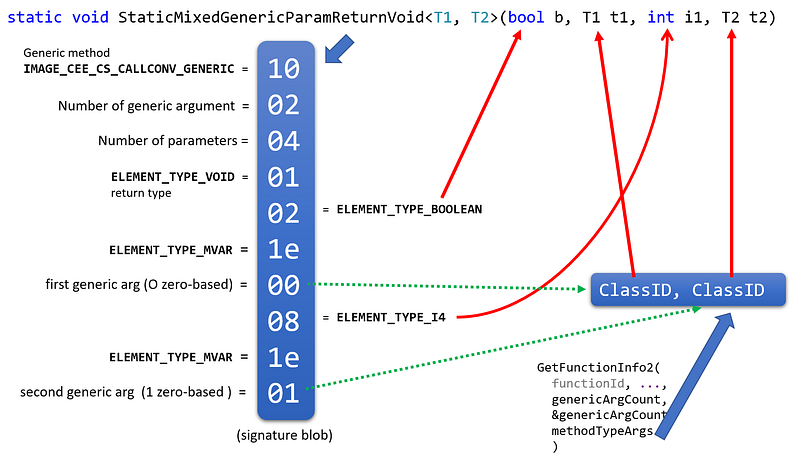
Decyphering methods signature with .NET profiling APIs

Introduction After introducing the CLR profiling API by tracing managed methods calls, then dealing with assemblies and types, it is time to look at methods signatures. Remember that the starting point is the FunctionID received by the Enter callback each time a method is executed. The question answered by this post is how to build the signature of the method given a FunctionID. A method signature is built from its return value (or void), its name and a list of parameters. All these details are stored in the module metadata generated by the C# compiler. So the first step is to get the metadata token corresponding to a FunctionID thanks to ICorProfilerInfo::GetFunctionInfo: ...

October 12, 2021 · 6 min · Christophe Nasarre

Dealing with Modules, Assemblies and Types with CLR Profiling APIs

Introduction In the first post of this series dedicated to CLR Profiling API, you have seen how to get a FunctionID each time a managed method is executed in a .NET application. As David Broman (source of most of the profiling implementation details at Microsoft) explains, a FunctionID is a pointer to an internal data structure of the CLR called a MethodDesc. For us, it is just an opaque value that is usable in different CLR APIs. So what if you would like to know the name of the method behind this FunctionID? ...

September 6, 2021 · 10 min · Christophe Nasarre

Start a journey into the .NET Profiling APIs

Introduction When I want to dig into a new API, I implement a real world scenario. This is exactly what I did for the .NET native profiling API. I want to know how to get parameters and return value of any method call during any .NET application life. The expected result would be something like : Enter PublicClass::ClassParamReturnClass this = 0x6f97e190 (8) ClassType obj = 0x6f97e488 (8) | int32 <IntProperty>k__BackingField = 84 | int32 intField = 42 | String stringField = 43 ClassType obj = 0x0000023A475BBAD8 Leave PublicClass::ClassParamReturnClass | int32 <IntProperty>k__BackingField = 170 | int32 intField = 85 | String stringField = 86 returns 0x0000023A475BBBB0 when the following method is executed: ...

August 7, 2021 · 6 min · Christophe Nasarre

Profile memory allocations with Perfview

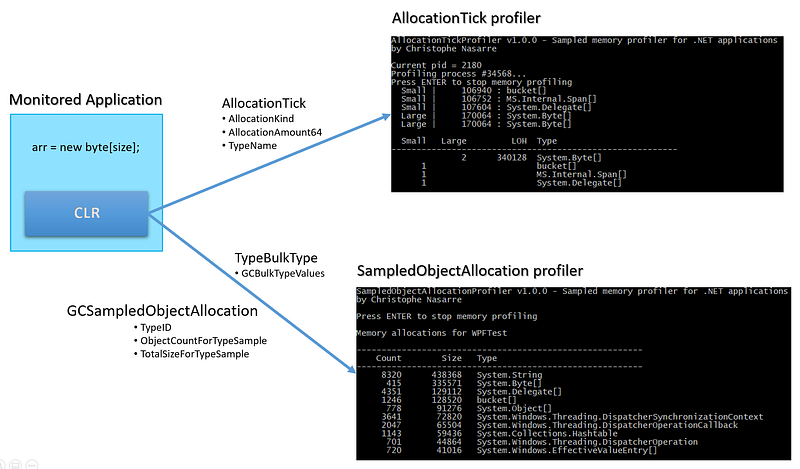
I have already explained how to write your own allocation monitoring tool. Each time 100 cumulated KB are allocated, the CLR emits an AllocationTick event with the name of the last allocated type before the 100 KB threshold and if it is in the LOH or not. This post shows you how to get these events with the corresponding callstacks thanks to the Microsoft Perfview free tool. On Linux, things are a little bit more complicated because the Kernel provider does not exist to emit callstacks events. Microsoft provides the perfcollect script to get a zip file containing both the CLR events (collected by LTTng) and the callstacks (collected via perf). If you want, like dotnet-trace, to rely on EventPipe instead of LTTng, you could use Criteo fork of the perfcollect script and the corresponding updated version of Perfview to open the generated .trace.zip file. Note that our Pull Request to the Microsoft Perfview repository is still pending… ...

July 20, 2021 · 3 min · Christophe Nasarre

Memory Anti-Patterns in C#

In the context of helping the teams at Criteo to clean up our code base, I gathered and documented a few C# anti-patterns similar to Kevin’s publication about performance code smell. Here is an extract related to good/bad memory patterns. Even though the garbage collector is doing its works out of the control of the developers, the less allocations are done, the less the GC will impact an application. So the main goal is to avoid writing code that allocates unnecessary objects or references them too long. ...

July 1, 2021 · 14 min · Christophe Nasarre

How to ease async callstacks analysis in Perfview

Introduction In the previous post, I described why you might get weird reversed callstacks in Visual Studio when analyzing or debugging async/await code. And if you are using Perfview to profile the same application, you should also get the same reverse continuation flow: The rest of the post describes how to easily profile with Perfview and more interestingly, how to leverage grouping/folding features to get much more readable asynchronous callstacks. ...

March 2, 2021 · 5 min · Christophe Nasarre

Understanding “reversed” callstacks in Visual Studio and Perfview with async/await code

Introduction With my colleague Eugene, we spent a long time analyzing performances of one of Criteo main applications with Perfview. The application is processing thousand of requests in an asynchronous pipeline full of async/**await **calls. During our research, we ended up with weird callstacks that looked kind of “reversed”. The goal of this post is to describe why this could happen (even in Visual Studio). Let’s see the result of profiling in Visual Studio I wrote a simple .NET Core application that simulates a few async/**await **calls: ...

January 19, 2021 · 7 min · Christophe Nasarre

Build your own .NET CPU profiler in C#

The last series was describing how to get details about your .NET application allocation patterns in C#. Get a sampling of .NET application allocations A simple way to get the call stack Getting the call stack by hand It is now time to do the same but for the CPU consumption of your .NET applications. Thanks you Mr Windows Kernel! Under Windows, the kernel ETW provider allows you to get notified every milli-second with the call stack of all threads running on a core. Without any surprise, it is easy with TraceEvent to listen to these events. As explained in an old posts, you simply need to create a session, enable providers and listen to the right event. ...

December 8, 2020 · 13 min · Christophe Nasarre

How to write your own commands in dotnet-dump (2/2)

In the previous post, I presented the new commands that were added to dotnet-dump and how to use them. It is now time to show how to implement such a command. But before jumping into the code, you should first ensure that you have a valid use case that the Diagnostics team is not currently working on. I recommend to create an issue in the Diagnostics repository to explain what is missing for which scenario and propose to implement the corresponding command. ...

November 9, 2020 · 2 min · Christophe Nasarre

How to extend dotnet-dump (1/2) — What are the new commands?

Introduction To ease our troubleshooting sessions at Criteo, new high level commands for WinDBG have been written and grouped in the gsose extension. As we moved to Linux, Kevin implemented the plumbing to be able to load gsose into LLDB. In both cases, our extension commands are based on ClrMD to dig into a memory dump. As Microsoft pushed for dotnet-dump as the new cross-platform way to deal with memory dump, it was obvious that we would have to be able to use our extension commands in dotnet-dump. Unfortunately dotnet-dump does not support any extension mechanism. In May this year, Kevin updated a minimum of code to load a list of extension assemblies at the startup of dotnet-dump. I followed another direction by adding a “load” command to dynamically add extensions commands. ...

September 29, 2020 · 7 min · Christophe Nasarre

The .NET Core Journey at Criteo

Introduction When I arrived at Criteo in late 2016, I joined the .NET Core “guild” (i.e. group of people from different teams dedicated to a specific topic). The first meeting I attended included Microsoft folks led by Scott Hunter (head of .NET program management) and including David Fowler (SignalR and ASP.NET Core). The goal for Criteo was simple: Moving a set of C# applications from Windows/.NET Framework to Linux/.NET Core. I guess that for Microsoft we were a customer with workloads that could be interesting to support with .NET Core. At that time, I did not realize how strong their commitment to work with us was. Our Open Source mindset was the selling point. ...

July 31, 2020 · 10 min · Christophe Nasarre

Build your own .NET memory profiler in C# — call stacks (2/2–2)

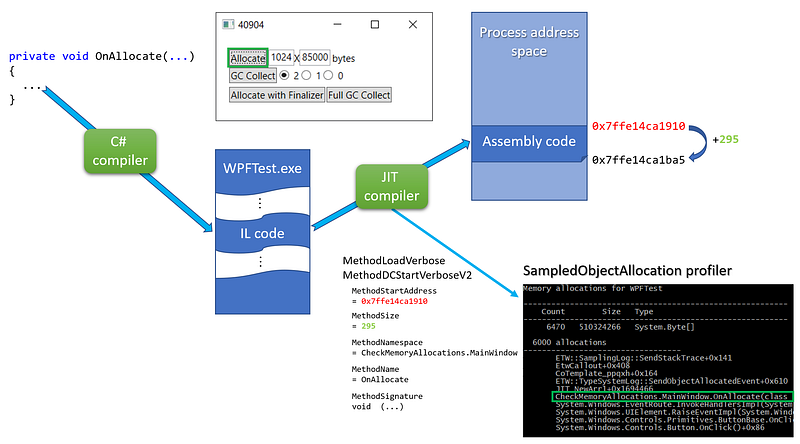
In the past two episodes of this series I have explained how to get a sampling of .NET application allocations and one way to get the call stack corresponding to the allocations; all with CLR events. In this last episode, I will detail how to transform addresses from the stack into methods name and possibly signature. From managed address to method signature In order to transform an address on the stack into a managed method name, you need to know where in memory (i.e. at which address) is stored the method JITted assembly code and what is its size: ...

June 19, 2020 · 9 min · Christophe Nasarre

Build your own .NET memory profiler in C# — call stacks (2/2–1)

In the previous episode of this series, you have seen how to get a sampling of .NET application allocations thanks to the AllocationTick and GCSampleObjectAllocation(High/Low) CLR events. However, this is often not enough to investigate unexpected memory consumption: you would need to know which part of the code is triggering the allocations. This post explains how to get the call stack corresponding to the allocations, again with CLR events. Introduction If you look carefully at the payload of the TraceEvent object mapped by Microsoft TraceEvent library (not my fault if they have the same name) for each CLR event, you won’t see anything related to a call stack. However, in the TraceEvent sample 41, the following line looks promising: ...

May 18, 2020 · 12 min · Christophe Nasarre

Build your own .NET memory profiler in C# — Allocations (1/2)

In a previous post, I explained how to get statistics about the .NET Garbage Collector such as suspension time or generation sizes. But what if you would need more details about your application allocations such as how many times instances of a given type were allocated and for what cumulated size or even the allocation rate? This post explains how to get access to such information by writing your own memory profiler. The next one will show how to collect each sampled allocation stack trace. ...
April 18, 2020 · 12 min · Christophe Nasarre

Debugging Wednesday at Criteo — Cancel this task!

Introduction Last Wednesday was a great day for Kevin and myself: We spent a lot of time investigating the reasons why a test was failing. Let’s share with you these frustrating but interesting minutes. One of our colleagues came to us because an integration test would get stuck in some specific conditions. Here is the simplified code of the service that is supposed to do some background processing until it is stopped: ...

February 21, 2020 · 9 min · Christophe Nasarre

Getting another view on thread stacks with ClrMD

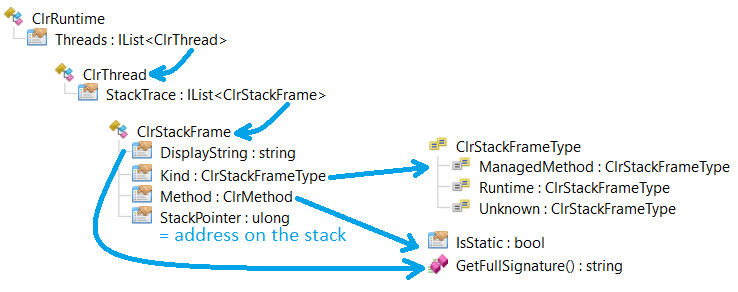
This post of the series details how to look into your threads stack with ClrMD. Introduction It’s been a long time (see the resources at the end) since I’ve been discussing what ClrMD could bring to .NET developers/DevOps! My colleague Kevin just wrote an article about how to emulate SOS DumpStackObjects command both on Windows and Linux with ClrMD. This implementation lists the objects on the stack but without their values (like strings content for example) nor the stack frames corresponding to the method calls. ...

December 31, 2019 · 7 min · Christophe Nasarre

WSL + Visual Studio = attaching/launching a Linux .NET Core application on my Window 10

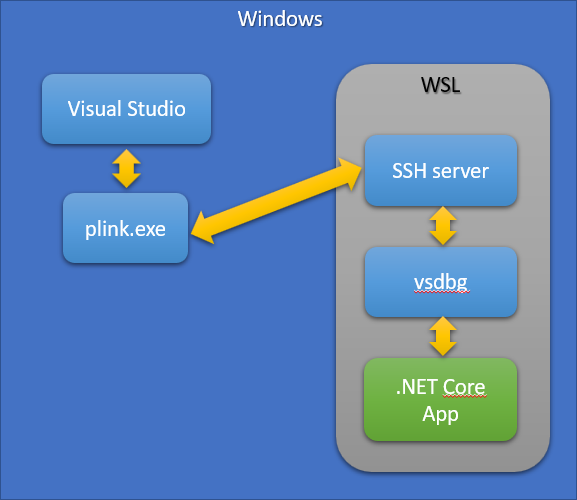
This post shows how to attach to a .NET Core process running on Linux with WSL and also how to start a Linux process with Visual Studio debugger Coming from the Windows world, I don’t find that easy to develop .NET Core applications for Linux. I’m used to code and debug in Visual Studio. Now, I need to build on Windows (due to our Criteo continuous integration), deploy an artifact to Marathon in order to get an application running inside a Mesos container. At Criteo, we had to build a whole set of services to allow remote debugging or memory dump analysis. ...

November 21, 2019 · 6 min · Christophe Nasarre

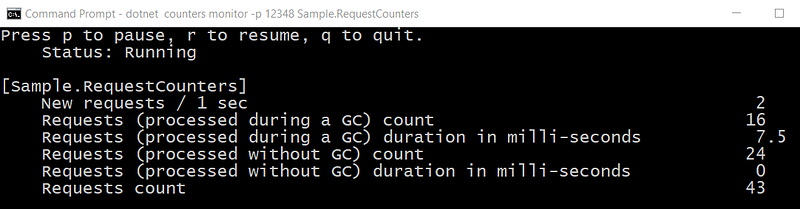
How to expose your custom counters in .NET Core

This post of the series explains how to implement your own counters. Part 1: Replace .NET performance counters by CLR event tracing. Part 2: Grab ETW Session, Providers and Events. Part 3: CLR Threading events with TraceEvent. Part 4: Spying on .NET Garbage Collector with TraceEvent. Part 5: Building your own Java GC logs in .NET Part 6: Spying on .NET Core Garbage Collector with .NET Core EventPipes Part 7: .NET Core Counters internals: how to integrate counters in your monitoring pipeline ...

October 17, 2019 · 7 min · Christophe Nasarre

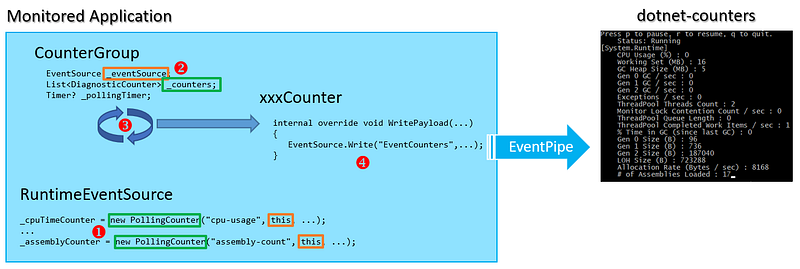
.NET Core Counters internals: how to integrate counters in your monitoring pipeline

This post of the series digs into the implementation details of the new .NET Core counters. Part 1: Replace .NET performance counters by CLR event tracing. Part 2: Grab ETW Session, Providers and Events. Part 3: CLR Threading events with TraceEvent. Part 4: Spying on .NET Garbage Collector with TraceEvent. Part 5: Building your own Java GC logs in .NET Part6: Spying on .NET Core Garbage Collector with .NET Core EventPipes Introduction As explained in a previous post, .NET Core 2.2 introduced the EventListener class to receive in-proc CLR events both on Windows and Linux. Starting with .NET Core 3.0 Preview 6, the EventPipe-based infrastructure makes it now possible to get these events from another process. The diagnostics repository contains the cross-platform tools leveraging this infrastructure: ...

July 23, 2019 · 13 min · Christophe Nasarre

Spying on .NET Garbage Collector with .NET Core EventPipes

This post of the series shows how to generate GC logs in .NET Core with the new event pipes architecture and details the events emitted by the CLR during a collection. Part 1: Replace .NET performance counters by CLR event tracing. Part 2: Grab ETW Session, Providers and Events. Part 3: CLR Threading events with TraceEvent. Part 4: Spying on .NET Garbage Collector with TraceEvent. Part 5: Building your own Java GC logs in .NET ...

May 28, 2019 · 12 min · Christophe Nasarre

Let’s debug the Core CLR with WinDBG!

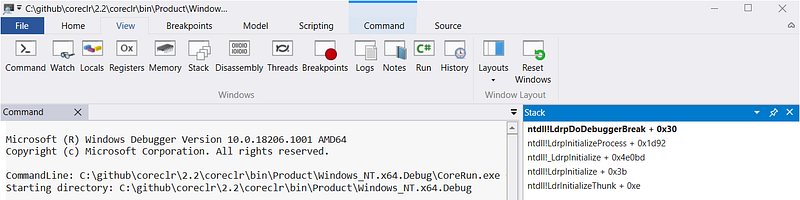
This post of the series shows how we debugged the Core CLR to figure out insane contention duration. Part 1: Replace .NET performance counters by CLR event tracing. Part 2: Grab ETW Session, Providers and Events. Part 3: CLR Threading events with TraceEvent. Part 4: Spying on .NET Garbage Collector with TraceEvent. Part 5: Building your own Java GC logs in .NET. Introduction Long before migrating our .NET applications to Linux, our first step was to build a monitoring pipeline based on LTTng instead of ETW on Windows. To achieve this goal, the open source TraceEvent Nuget package needed to be updated in order to listen to LTTng live session (only a file based implementation was provided by Microsoft; mostly to allow Perfview to be able to open traces taken on Linux machines). This was a huge development task that led sometimes to weird results. Among the metrics we wanted to monitor, the contention duration gave insane value such as thousands of minutes… per minute: ...

April 4, 2019 · 10 min · Christophe Nasarre

Debugging Friday — Hunting down race condition

Introduction At Criteo, CLR metrics are collected by a service that listens to ETW events (see the related series). On a few servers, the metrics stopped being collected and we had to fix the problem by manually polling new and dead processes. After deploying the new version, the same scenario started to happen: on some servers, the metrics were no more collected. In an investigation, the first step is always trying to check the environment. In our case, on a server where the metrics collector is up and running, a dedicated ETW session should be created to listen to the CLR events. ...

February 22, 2019 · 7 min · Christophe Nasarre

Building your own Java-like GC logs in .NET

This post of the series focuses on logging each GC details in a file and how to leverage it during investigations. Part 1: Replace .NET performance counters by CLR event tracing. Part 2: Grab ETW Session, Providers and Events. Part 3: Monitor Finalizers, contention and threads in your application. Part 4: Spying on .NET Garbage Collector with TraceEvent. Introduction I’m working in a team where we investigate issues in production: both for Java and .NET applications. This is a good opportunity to learn what are the features provided by Java that are missing in .NET. One of the features heavily discussed with my colleague Jean-Philippe is called the GC Log. It is possible to start an application with parameters that tell the GC to save tons of details about each garbage collection in a file : the GC Log. Based on this file, it is possible to extract the reason of a collection, the times of the different phases including the suspension time. This is a great source of information during investigations… when you know how GC is working or by leveraging automatic report generation. ...
February 12, 2019 · 9 min · Christophe Nasarre

Fixing .NET middle-age crisis with Java ReferenceQueue and Cleaner

My colleague Kevin has just described how to implement Java ReferenceQueue in C# as a follow-up to Konrad Kokosa’s article on this Java class. Among the different discussed features, one is still missing. This post will discuss how to deal with the “middle age crisis” scenario and control finalizer threading issues. I’m sure that my former Microsoft colleague Sebastien won’t be surprised by my interest in the subject. When a class references both IDisposable instances and native resources, the usual C# pattern is to implement both IDisposable for explicit cleanup and a Finalizer to deal with developers who would have forgotten the explicit cleanup. This pattern might have a side effect when these classes are also referencing a large objects graph. ...

January 16, 2019 · 11 min · Christophe Nasarre

Spying on .NET Garbage Collector with TraceEvent

This post of the series focuses on CLR events related to garbage collection in .NET. Part 1: Replace .NET performance counters by CLR event tracing. Part 2: Grab ETW Session, Providers and Events. Part 3: CLR Threading events with TraceEvent. Introduction The allocator and garbage collector components of the CLR may have a real impact on the performances of your application. The Book of the Runtime describes the allocator/collector design goals in the must read Garbage Collection Design page written by Maoni Stephens, lead developer of the GC. In addition, Microsoft provides large garbage collection documentation. And if you want more details about .NET garbage collector, take a look at Pro .NET Memory Management by Konrad Kokosa. In this post, I will focus on the events emitted by the CLR and how you could use them to better understand how your application is behaving, related to its memory consumption. ...

December 15, 2018 · 7 min · Christophe Nasarre

In-process CLR event listeners with .NET Core 2.2

As the .NET Core 2.2 blog post introduced, it is now possible for a .NET Core application to listen to the events generated by the CLR that power it up. If you remember the Grab ETW Session, Providers and Events post, the CLR is emitting a lot of valuable events through ETW on Windows and LTTng on Linux. Thanks to TraceEvent nuget package, it is not that difficult to fetch these events at runtime on Windows, either in-process or out of process. However, it is much more complicated to achieve the same goal on Linux… With .NET Core 2.2, it is now super easy to listen to the events emitted by the CLR while your application is running: you simply need to implement a class that derives from System.Diagnostics.Tracing.EventListener and create an instance of it. Nothing more. ...

December 6, 2018 · 6 min · Christophe Nasarre

[C#] Get-process-name challenge on a Friday afternoon

Unexpected CPU consumption At Criteo, CLR metrics are collected by a service that listens to ETW events (see the related series). This metrics collector is given the process name of applications to monitor. Since applications could crash, be stopped or restarted, the metrics collector must be able to detect such an event. The previous implementation was using ETW kernel events (TraceEvent ProcessStart and ProcessStop events from ETWTraceEventSource.Kernel). However, in rare cases, it seems that a new application start was not detected and therefore the metrics were not collected for it. ...

November 13, 2018 · 7 min · Christophe Nasarre

Monitor Finalizers, contention and threads in your application

Part 1: Replace .NET performance counters by CLR event tracing. Part 2: Grab ETW Session, Providers and Events. Introduction In the previous post, you saw how the TraceEvent nuget helps you deciphering simple ETW events such as the one emitted when a first chance exception happens. Most situations trigger more than one event and could make their processing more complicated. Who said Finalizer? In the early days of .NET, you might had to deal with native resources that you were responsible for cleaning up with the related unmanaged API or legacy COM component. It was a best practice to implement a ~finalizer method to ensure that everything was deleted the right way. These times are over for most of us now. If you don’t have an IntPtr field in your class, chances are that you don’t need a ~finalizer method. ...

September 28, 2018 · 6 min · Christophe Nasarre

Grab ETW Session, Providers and Events

Part 1: Replace .NET performance counters by CLR event tracing. In the previous post, you saw that the CLR is emitting traces that could (should?) replace the performance counters you are using to monitor your application and investigate when something goes wrong. The perfview tool that was demonstrated is built on top of the Microsoft.Diagnostics.Tracing.TraceEvent Nuget package and you should leverage it to build your own monitoring system. In addition, the Microsoft.Diagnostics.Tracing.TraceEvent.Samples Nuget package contains sample code to help you ramping up. ...

July 26, 2018 · 7 min · Christophe Nasarre

Replace .NET performance counters by CLR event tracing

Introduction At Criteo, each .NET application provides custom metrics to monitor deviation and trigger alerts. This is the first line of defense against misbehaviors. The next step is to figure out what could be the cause of these deviations. After source code changes analysis, it is often needed to dig deeper into performance counters exposed by the CLR such as the following: Again, these counters are used to detect possible deviations in usual patterns. For example, some applications are supposed to answer under a 50 ms threshold. When the corresponding “number of timeouts” or “request time” metrics start to increase, several reasons linked to the CLR might be partially responsible but it is hard to tell: ...

June 19, 2018 · 5 min · Christophe Nasarre

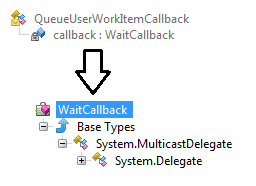
ClrMD Part 9 – Deciphering Tasks and Thread Pool items

This post of the series shows how to easily list pending tasks and work items managed by the .NET thread pool using DynaMD proxies. Part 1: Bootstrap ClrMD to load a dump. Part 2: Find duplicated strings with ClrMD heap traversing. Part 3: List timers by following static fields links. Part 4: Identify timers callback and other properties. Part 5: Use ClrMD to extend SOS in WinDBG. Part 6: Manipulate memory structures like real objects. Part 7: Manipulate nested structs using dynamic. ...

December 22, 2017 · 6 min · Christophe Nasarre

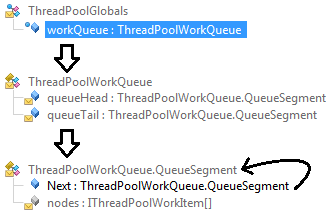
ClrMD Part 8 – Spelunking inside the .NET Thread Pool

This post of the series shows how to easily list pending tasks and work items managed by the .NET thread pool using DynaMD proxies. Part 1: Bootstrap ClrMD to load a dump. Part 2: Find duplicated strings with ClrMD heap traversing. Part 3: List timers by following static fields links. Part 4: Identify timers callback and other properties. Part 5: Use ClrMD to extend SOS in WinDBG. Part 6: Manipulate memory structures like real objects. Part 7: Manipulate nested structs using dynamic. ...

November 3, 2017 · 5 min · Christophe Nasarre

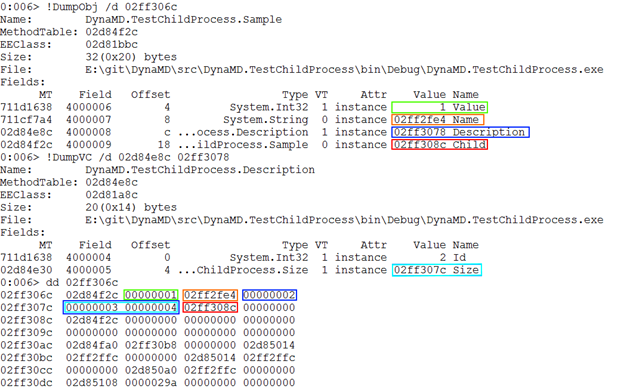
ClrMD Part 7 – Manipulate nested structs using dynamic

In the previous post of the ClrMD series, we’ve seen how to use dynamic to manipulate objects from a memory dump the same way as you would with actual objects. However, the code we wrote was limited to class instances. This time, we’re going to see how to extend it to structs. The associated code is part of the DynaMD library and is available on GitHub and nuget. Part 1: Bootstrap ClrMD to load a dump. ...

August 28, 2017 · 5 min · Christophe Nasarre

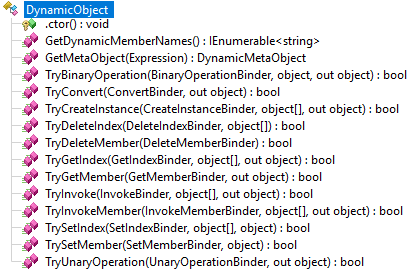
ClrMD Part 6 - Manipulate memory structures like real objects

This sixth post of the ClrMD series details how to make object fields navigation simple with C# like syntax thanks to the dynamic infrastructure. The associated code is part of the DynaMD library and is available on GitHub and nuget. Part 1: Bootstrap ClrMD to load a dump. Part 2: Find duplicated strings with ClrMD heap traversing. Part 3: List timers by following static fields links. Part 4: Identify timers callback and other properties. Part 5: Use ClrMD to extend SOS in WinDBG. ...

August 1, 2017 · 6 min · Christophe Nasarre

ClrMD Part 5 – How to use ClrMD to extend SOS in WinDBG

This fifth post of the ClrMD series shows how to leverage this API inside a WinDBG extension. The associated code allows you to translate a task state into a human readable value. Part 1: Bootstrap ClrMD to load a dump. Part 2: Find duplicated strings with ClrMD heap traversing. Part 3: List timers by following static fields links. Part 4: Identify timers callback and other properties. Introduction Since the beginning of this series, you have seen how to use ClrMD to write your own tool to extract meaningful information from a dump file (or a live process). However, most of the time, you are also using WinDBG and SOS to navigate inside the .NET data structures. ...

June 29, 2017 · 8 min · Christophe Nasarre

ClrMD Part 4 – What callbacks are called by my timers?

This fourth post of the ClrMD series digs into the details of figuring out which method gets called when a timer triggers. The associated code lists all timers in a dump. Part 1: Bootstrapping ClrMD to load a dump. Part 2: Finding duplicated strings with ClrMD heap traversing. Part 3: List timers by following static fields links. Looking at my timer In the previous post, we explained how to access a static field of TimerQueue to start iterating the list of TimerQueueTimer wrapping the created timers. Now that the currentPointer variable contains the address of each TimerQueueTimer, it is time to extract the details of the timer we have created. ...

May 31, 2017 · 5 min · Christophe Nasarre

ClrMD Part 3 - Dealing with static and instance fields to list timers

This third post of the ClrMD series focuses on how to retrieve value of static and instance fields by taking timers as an example. The next post will dig into the details of figuring out which method gets called when a timer triggers. As an example, the associated code lists all timers in a dump and covers both articles. Part 1: Bootstrapping ClrMD Post 2: Finding duplicated strings with ClrMD Marshaling data from a dump Beyond heap navigation shown in the previous post, the big thing to understand about ClrMD is that the retrieved information is often an address. An address from another address space because the dump is seen as another process just like if you were debugging it live. Your code will need to access the other process memory corresponding to this address; not directly with a pointer/reference indirection or with the raw Win32 ReadProcessMemory API function but via APIs like GetObjectType or GetValue. ...

May 3, 2017 · 7 min · Christophe Nasarre

RyuJIT and the never-ending ThreadAbortException

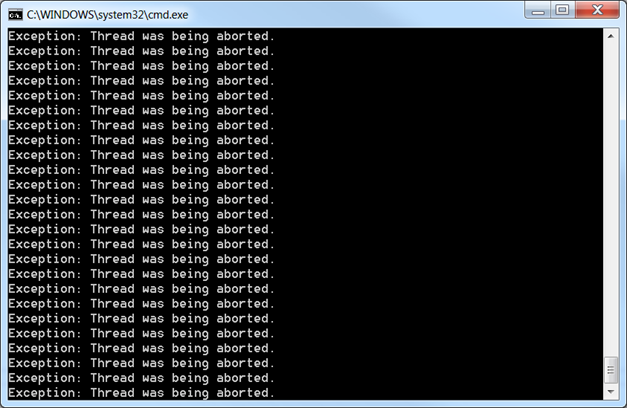
When you see this, you know for sure that something is wrong with a server: This chart counts the number of first-chance exceptions thrown by the server. We have here an average of 840K exceptions thrown per minute, or 14K exceptions per second. That’s a lot, especially considering that this server only processes about 400 requests per second. Impossible to find anything meaningful or even related in the logs, and the server seems to respond properly to requests: head scratching situation for sure. ...

April 6, 2017 · 6 min · Christophe Nasarre

ClrMD Part 2 - From ClrRuntime to ClrHeap or how to traverse the managed heap

This second post in the ClrMD series details the basics of parsing the CLR heaps. The associated code checks string duplicates as sample. Part 1: Bootstrapping ClrMD to load a dump. From ClrRuntime to ClrHeap or how to traverse the managed heap In the previous post, we have boostrapped the code needed to load a memory dump and get an instance of ClrRuntime. This type is the starting point for accessing the content of a managed process with ClrMD: ...

March 24, 2017 · 5 min · Christophe Nasarre

ClrMD Part 1 - Going beyond SOS

A little bit of context Thousands of servers are closely monitored at Criteo and when inconsistent behaviors are detected, an investigation is started based on these deviant machines. The level of details provided by the monitoring is close to what is provided by performance counters. Our team is using them to guess where the problem could come from. The next step is to have a closer look to one of the faulting machines in order to figure out whether our guess is valid… or not. ...

February 21, 2017 · 7 min · Christophe Nasarre
Get new posts by email: